Reaching the databases behind the wall
Elyra Conductor 0.6.3 teaches the database browser to tunnel through SSH, splits a crowded header into two calm rows, and lets you export a whole table — not just the page you can see.
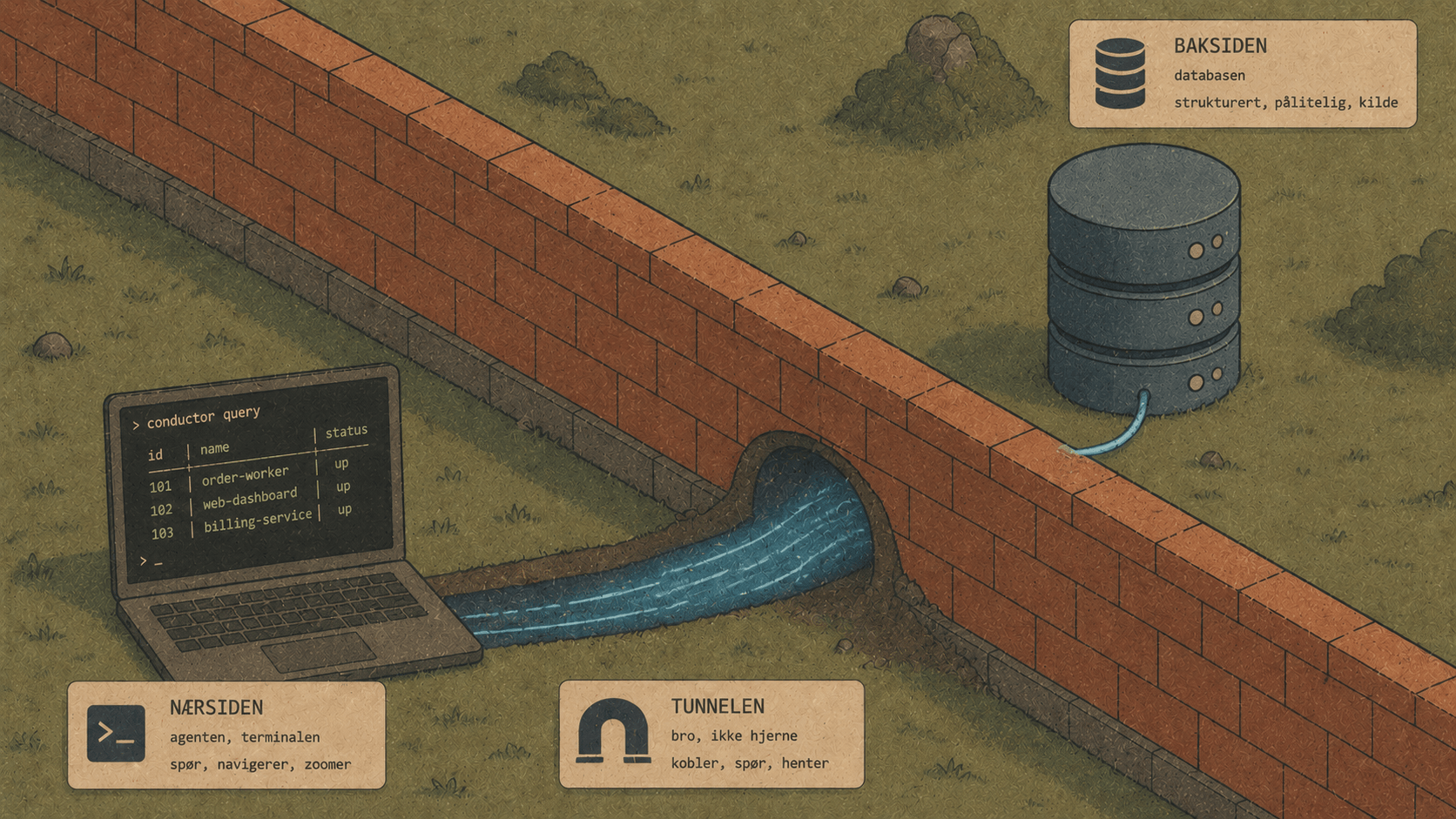
Elyra Conductor 0.6.3 teaches the database browser to tunnel through SSH, splits a crowded header into two calm rows, and lets you export a whole table — not just the page you can see. A fireside tour of why each one mattered, with examples.
Most of the interesting databases aren't on your laptop. They're behind a jump host, on a private network, reachable only if you first ssh somewhere. Until now, Conductor's database browser could talk to anything you could reach directly — which quietly excluded a lot of real, working databases.
0.6.3 is mostly about reach and room: reaching the databases behind the wall, and making room in a header that had started to crowd. Let's walk through it.
🔐 SSH tunnels: the database behind the jump host
Here's the situation the feature solves. Your production Postgres lives on a private network. From your machine you can't connect to it directly — but you can SSH to a bastion host, and from there the database is reachable at 127.0.0.1:5432. The classic dance is:
ssh -L 5433:127.0.0.1:5432 deploy@bastion.example.com
# ...then point your client at localhost:5433
…in a spare terminal you have to remember to keep open. 0.6.3 folds that whole dance into the connection form. Tick Use SSH tunnel and you get:
Host        127.0.0.1        ← the DB as seen FROM the SSH server
Port        5432
Database    app_production
User        readonly
Password    ••••••••
☑ Use SSH tunnel (remote)
SSH host     bastion.example.com
SSH port     22
SSH user     deploy
Auth method  [ Public key ▾ ]
Private key  /.ssh/id_ed25519
Passphrase   ••••••••
Hit Test connection or Connect & save and Conductor does the rest: it opens a local port-forward with the system ssh, waits for the tunnel to come up, and points the database driver at the forwarded port. The tunnel lives exactly as long as the connection, and dies when you disconnect.
The details that make it pleasant
Both auth methods. Public key (with an optional passphrase) or a password — whichever your server wants.
Secrets never touch a tty. Conductor is a GUI app with no controlling terminal, so
sshreaches for an askpass helper. We write a tiny one-shot script that supplies the password or passphrase, and delete it the instant authentication finishes.just works. Type~/.ssh/id_ed25519and Conductor expands it.Secrets live in the Keychain. The SSH password, passphrase, and key path are stored alongside the rest of the connection in the macOS Keychain — never in a committable file.
The tunnel is the encryption. For tunneled connections, TLS is skipped on purpose: the SSH channel already encrypts everything, and TLS to
127.0.0.1would just trip over hostname checks.
The mental model is simple: the Host/Port at the top are "where's the database, from the SSH server's point of view" — usually 127.0.0.1 and the normal port. Everything else is just how you get into that server.
📤 Export the whole table, not just the page
The database grid pages in chunks of 100 rows so it stays fast. That's great for browsing — and quietly wrong for exporting. If you clicked ⤓ Excel, you got… the 100 rows you happened to be looking at. Surprising, in the bad way.
Now, in a table's Data view, export means the whole table:
addresses.xlsx
┌──────────┬──────────────────────┬────────┬─────────────┐
│ id       │ street               │ city   │ postal_code │   ← the database field names
├──────────┼──────────────────────┼────────┼─────────────┤
│ 1        │ Storgata 1           │ Oslo   │ 0155        │
│ …        │ …                    │ …      │ …           │   ← all 48,000 rows, not 100
└──────────┴──────────────────────┴────────┴─────────────┘
The first row is the database field names, as you'd expect. And it respects whatever you've filtered and sorted — so "export every refunded order from last month, newest first" is just: filter, sort, ⤓ Excel.
Under the hood, the browser's 1,000-row safety cap (which keeps casual queries snappy) is lifted for exports — Conductor runs the full SELECT and streams it into the spreadsheet, values as text so IDs and postcodes with leading zeros survive intact. In a query tab, export still means "the result I'm looking at," which is exactly right there.
🧱 A header with room to breathe
As Conductor grew, its top bar filled up: tabs on the left, then Search, Quick edit, editor and panel toggles, Ports, Timeline, Tasks, Env, Git, Sync, theme, Layout, help… all fighting the tabs for the same row. The tabs lost. Open a handful of projects and they'd squeeze down to unreadable slivers.
0.6.3 splits the header into two calm rows:
┌─ Search ⌘K · Quick edit ┊ View: Files · DB · Editor ┊ Tools: ⚡Ports 🕘Timeline ☰Tasks 🔑Env ⎇Git    ⌁Sync ☀ ⬡Layout ? ─┐
├────────────────────────────────────────────────────────────────────────────────────────────────────────────────────┤
│ ● inside-works ×   ● khsite ×   ● flux ×   inside2 ×   feed3 ×   +          ← full width, scrolls horizontally        │
└────────────────────────────────────────────────────────────────────────────────────────────────────────────────────┘
Row one is the global toolbar, now grouped — View (the panels you toggle) and Tools (the things you open) separated by thin dividers, with the housekeeping controls pushed to the right.
Row two is just your work tabs, full width. When you have many, they scroll instead of shrinking — each tab keeps its size and stays readable.
It costs one slim extra row of height, and buys a header that can keep growing without ever crushing the tabs again.
⌨️ And a small one: ⌘T
The database explorer now toggles with ⌘T. (We tried ⌘⌥D first — turns out macOS already claims that one for the Dock. ⌘T was free, and close at hand.)
A note from behind the curtain
This release also had a moment worth telling, because it wasn't our bug. After building and signing 0.6.3, the DMG went off to Apple's notary service — and sat there. "In Progress" for over an hour, with notarytool even crashing once with a Bus error mid-wait. Nothing wrong with the build; Apple's service was simply stuck.
The fix turned out to be delightfully mundane: submit it again. The fresh job came back Accepted in under a minute, while the original was still spinning. So the lesson, now written down: when notarization hangs past ~15 minutes, don't keep waiting — resubmit. The build was always fine; the queue just needed a nudge.
The throughline
0.6.3 doesn't add a flashy new surface. It removes three quiet limits: the databases you couldn't reach, the rows you couldn't export, and the tabs you couldn't read. Reach, completeness, and room — the unglamorous trio that turns "nice tool" into "the tool I actually keep open."
Tick Use SSH tunnel, export the whole table, and watch your tabs stay legible no matter how many you open. The wall's still there — Conductor just learned to tunnel under it. 🪵🔥
Elyra Conductor 0.6.3 — SSH tunnels for remote databases, whole-table Excel/CSV export with field-name headers, a two-tier header, and ⌘T for the database explorer. Signed and Apple-notarized. Conductor runs and shows; it never reasons.