An activity monitor
that never invents a number.
macOS declines to describe about a quarter of the processes on an ordinary machine. Most monitors show those as zero. Starf shows them as —, because an unavailable counter is not a small one. CPU, memory, energy, disk, network and GPU with fifteen minutes of history; a process tree whose totals are honest about what they could not count; a diagnostics window for any process. Rust reads the kernel, Svelte draws. No helper tool, no elevated privileges, and nothing leaves the machine.
Free to download and use. macOS 13 or later on Apple silicon, signed with a Developer ID and notarized by Apple, so it opens without warnings.
starf Old Norse: work — labour, the doing of a thing. In Icelandic today, simply a job. An activity monitor watches what a machine is working on.
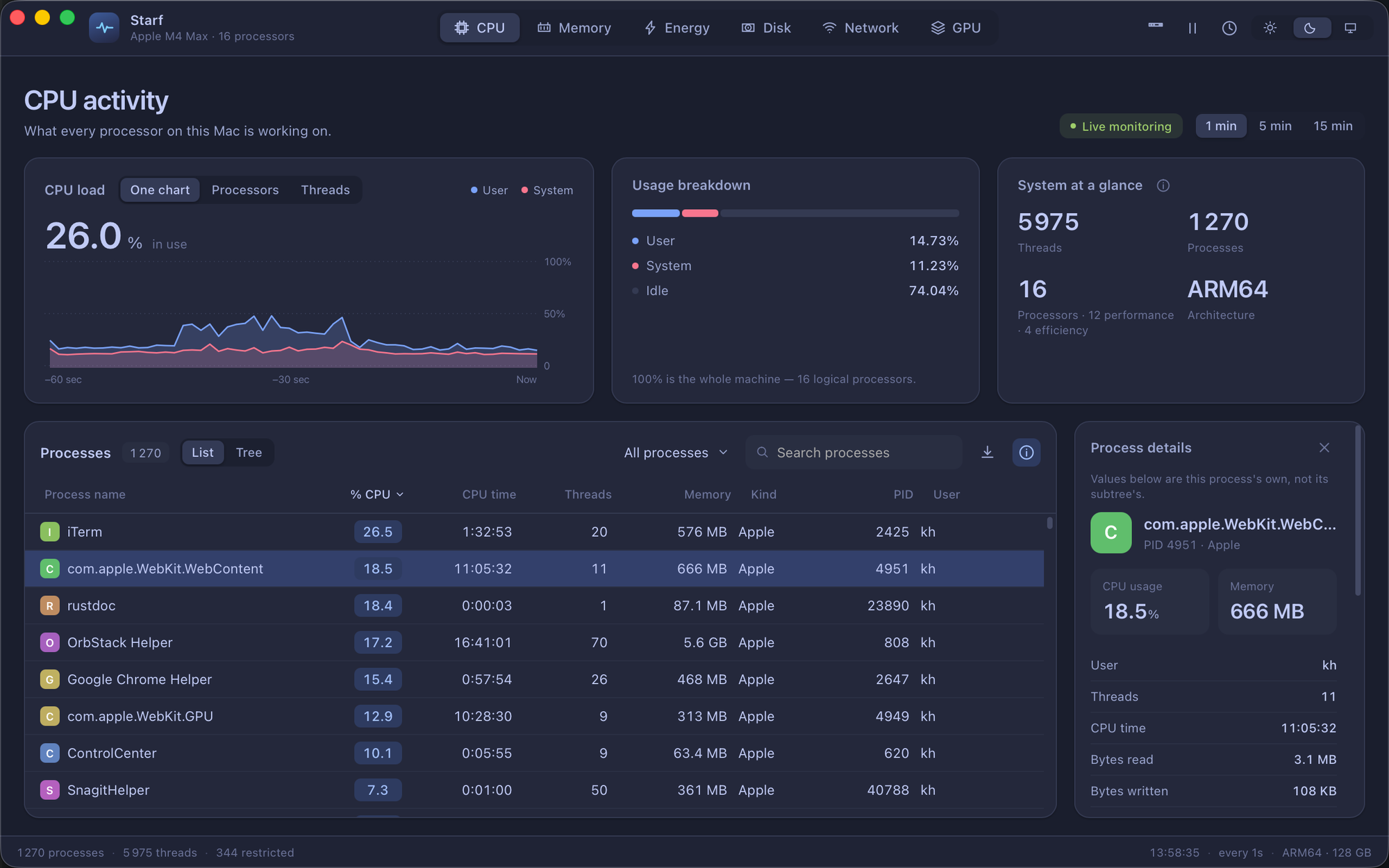
The CPU tab. A — was never measured; a 0.0 was.
Download for macOS
One disk image. Open it, drag Starf to Applications. The build is signed with a Developer ID and notarized by Apple, so Gatekeeper lets it through without a warning — and the checksum is beside it so you can check what you got.
macOS · Apple Silicon
Starf-0.3.0-arm64.dmg
2.9 MB
sha256 01938bd8bba915f9ec4649ea2167a4e3058837b0894105dd50896462bf94dd2c
Apple silicon is what this was built and checked on. The Intel paths exist in the code — the Rosetta timebase correction, the SMT note, the alternate GPU key — but have not run on Intel hardware, so no Intel build is offered. Nothing has been checked against an external GPU either. Where something has not been measured, the docs say so instead of guessing.
An unavailable counter
is not a zero.
One rule runs through all of it. A process macOS refuses to describe stays in the list with — where the kernel would not answer, exports as an empty cell and a JSON null, and sorts below every real value in both directions. A 0.0 means something was measured. Everything below follows from taking that seriously.
Six tabs, fifteen minutes of history
CPU, Memory, Energy, Disk, Network and GPU, each over the last one, five or fifteen minutes. The CPU card shows load as a share of total capacity, so user + system + idle is always 100 — and on sixteen processors the host figures sum to exactly 1600.00%. Memory is the one place the parts really do sum to the whole, and the breakdown bar says so; used is active + wired + compressed, and cached is shown separately because it is reclaimable.
Who was on top at that moment
Since 0.2.0 a click on any point in the CPU, Memory, Disk or GPU chart shows which processes were on top then, up to fifteen minutes back — the answer to what was that spike after it has passed. When the spike came from the system itself or from a process macOS keeps private, Starf says how much it could not attribute instead of blaming whatever happened to be listed. A process whose memory has climbed steadily for several minutes is tagged growing, with the rate and how far it has risen, and not called a leak: a cache that is still filling looks the same, and you know which it is. The bell in the title bar can notify you when a process stays busy, one keeps growing, memory pressure rises, the Mac runs hot or the battery runs low — all off until you turn them on, and each fires once rather than every second it stays true. The CPU tab shows macOS's own thermal pressure level, nominal to heavy, which is what macOS acts on rather than a temperature.
One chart per processor, and per thread
A grid of one chart per logical processor, each on its own 0–100% axis, filtered by Performance or Efficiency cores — the kind read from the device tree, and a processor whose kind the tree does not state keeps a neutral label rather than a guessed one. Select a process and the same grid shows its threads, collecting only while that mode is open. Blue is total utilisation; pink is the system portion of it, not a second quantity to add on.
A tree whose totals are honest
Switch the process table to Tree and numeric columns become Σ — the process plus every current descendant, counted once, including the ones hidden by search or collapse, so expanding, collapsing or searching never changes a total. ≥ marks a lower bound where a member would not report; — means nothing did. Hover a Σ cell to see the process's own value and how many members answered. Every subtree total is recomputed by an independent Python implementation and compared.
A PID is not an identity
macOS reuses PIDs, so everything that has to survive across samples is keyed by PID and start time together: rate baselines, so a new process never inherits the previous holder's counters; GPU observed time; tree expansion, so a recycled PID does not arrive collapsed. Before Starf signals a process or reads its diagnostics, it re-checks that the PID still names the same process with the same start time and owner — and checks again after the read, so a process that exits mid-walk cannot have its successor's files attributed to it.
Diagnostics for any process
A per-process window with open files, the memory map, Mach ports, fileports, resource counters, thread rates and on-demand reports from Apple's own tools. Open files match lsof descriptor for descriptor; region totals agree with the kernel's own figure even where vmmap, which runs with access Starf does not have, splits them differently. Another process's environment cannot be read without owning it — this was checked rather than assumed, and the Environment report says so instead of showing an empty list.
Rates from time actually measured
Every rate is a difference between two readings divided by the time that really passed between them, never by the interval that was asked for. A first reading has no rate: it establishes a baseline and shows —, not 0. Two yes processes read as exactly 100.0% each against ps's 99.1 and 98.9; under a Metal compute load the GPU device read 99% while the per-process figures summed to 99.9%. The numbers, and how each was checked, are in the docs.
Energy that says what it is
Apple's per-process Energy Impact is a private metric no unprivileged process can read. Starf does not implement it and dresses nothing up as it; the Energy tab shows the CPU counters and says so. Total system power needs SMC access, so Starf reports the battery's own charge and discharge flow — cycle count, charge against design capacity, voltage, current, temperature, the adapter's rating — and names it for what it is. Apple's Battery Health percentage is computed differently from ours, so ours is not shown under their name.
Network and disk, with their caveats on the label
A VPN's traffic crosses two interfaces — once in the clear on its tunnel, again encrypted on the interface the tunnel rides on — and a virtual machine's goes through three, so adding every interface counts the same bytes two or three times. Until 0.2.0 Starf did exactly that. The machine total now counts only hardware and radio interfaces and shows tunnels, bridges and VM interfaces beside it without adding them, and an unfamiliar name is counted rather than guessed at. Per-process network comes from nettop and matches it; those are cumulative totals, not rates, and follow the connections nettop can see, so they need not add up to the line above. The Disk tab shows what actually reached each disk, read from the disk driver without privileges and including the kernel, swap and the processes macOS keeps private, beside what the readable processes reported — counted at different layers and moments, so neither is shown as a share of the other. Each caveat is printed where the number is, because a caveat in a manual is a caveat nobody reads.
Columns you can resize, reorder and hide
Drag a column edge to resize, or double-click it to fit what the column actually holds — measured in the table's own font, not guessed. Drag a header to reorder. Each metric's table remembers its own layout, and only what you changed is stored, so a column you never touched still follows its definition. Hiding a column hides it from view only: search still matches it and exports still carry it — a column you hid is not one you stopped caring about.
CSV and JSON export
Export what the table shows, with the distinction kept: an unavailable counter is an empty CSV cell and a JSON null, never a 0. Search matches name, user or PID; filters — All, Mine, Active, Applications — match individual processes in both List and Tree. Sorting a column sorts by the value it displays, and unavailable values sort last whichever direction you choose. Since 0.2.0 a diagnostic bundle saves the last fifteen minutes — every chart, who was on top at each moment, the process list — as one file for a bug report, without your Mac's name or home folder and never with environment variables or command-line arguments. And starf top shows the busiest processes in a terminal from the same sampler as the window: sort by CPU, memory, disk or threads, print once for a script, or write one full sample as JSON.
A menu bar monitor, with pins
An optional menu bar item with a popover for a glance without the window, and per-process pins so the two or three processes you are watching stay in view. Optional, and off until you turn it on.
Sweep, the one part that changes anything
Since 0.3.0 the broom in the title bar finds what you can do without — Cargo targets and node_modules untouched for a month, build output git ignores, Xcode DerivedData, caches tools refill by themselves, and applications with what they left in your Library — and moves what you choose to the Trash. Nothing is deleted, Put Back works, and Undo takes the last sweep back. It keeps the rules the monitor keeps: a size that could not be measured is not zero, the window never names a path to move, only a candidate the last scan found, and each is checked again the moment before it moves. Removing an app takes only what matches its bundle identifier exactly, so another app from the same vendor is never touched; folders merely named like it are shown unselected, with a warning when they hold git work not yet pushed. Anything in /System, anything from Apple, Starf itself and a running app are refused. starf sweep does the same in a terminal and only lists until you add --apply.
Nothing transmitted
No elevated privileges, no helper tool, no SIP changes, and nothing leaves the machine. The one exception is asked for before it happens: on first launch Starf asks whether to watch for new versions, and does nothing on the network until you answer. Say yes and it fetches one small static file a day carrying no identifier, no version and no query string; the download address is compiled in, so a tampered file can at worst report a wrong number. Say no and it never opens a socket.
Where a figure cannot be had,
it is not invented.
Refused is not gone
Two different things stop Starf reading a process, and the kernel distinguishes them: EPERM means the process exists and macOS will not describe it; ESRCH means there is no such process. Conflating them is the easiest mistake in the codebase, and it was made once — the first per-thread probe against WindowServer reported it as exited while it was running perfectly well. Every message downstream now says which: macOS does not share this process's details, or this process has exited.
Checked against the tools you already trust
Process CPU against ps. Host CPU against the processor count and top. Core kinds against sysctl. GPU against a known Metal load. Open files against lsof, the memory map against vmmap and the kernel, per-process network against nettop, battery against pmset. The Verification page in the docs carries the numbers from each comparison — and where two tools disagree, it says which one is right and why.
Starf is Old Norse for work
Starf — work, labour, the doing of a thing; in Icelandic today it is simply a job. An activity monitor watches what a machine is working on, and a name that says only that seemed right. The application is a port of a Swift reference implementation that kept one rule above all others, and the port keeps it too: an unavailable counter is not a zero. Everything else on this page is that rule applied.
Free to download.
Free to use. A licence is a thank-you.
Every measurement, every tab, every diagnostic page works without a licence, now and later. What a licence changes is one thing: after seven days of use, and then at most once every five days, a sheet appears at launch to ask whether Starf has been useful enough to be worth a small one-off payment. A licence removes that sheet. Nothing is withheld, limited or timed for anyone who does not buy one.
The three buttons on that sheet are the same size and weight. Declining is not a lesser act, and a reminder that disguised its own dismissal would be worse than no reminder at all. It counts as shown the moment it appears, so closing it any way at all counts.
A licence for Starf
$39 one-time · never expires · no subscription
Pay once and a line of text beginning STARF-1-
is emailed to you within a minute. Click Unlicensed at the right of the status bar,
paste, return. The status bar says Licensed and the panel says who to — the key
is a signature over your email address, so it is visibly yours. You also get an account page where
the key can always be found again.
Card payment by Stripe. No account is needed to buy; one is created for you so the key is never lost. Questions or a refund — reply to the licence email.
- Checked where
- On your machine, and nowhere else. Signed with a key only the shop has; Starf carries the half that can verify and cannot sign.
- Phones home
- Never. Starf promises it transmits nothing, and a licence check that phoned home would break that promise for everyone. It works on a machine that has never been online.
- Can be copied
- Yes. An offline key can be shared, and that is accepted rather than fought: machine binding and activation servers inconvenience honest buyers most. People who were going to pay, pay.
See what the machine
is working on.
Download Starf, open the CPU tab, and find the processes macOS would rather not talk about — shown as exactly that, and nothing else.