 Elyra Workspace · For coding agents
Every agent thread,
in one native window.
Elyra Workspace is a local-first desktop workspace for coding agents, written in Rust on GPUI — the framework behind Zed. Add your project folders, give each task its own thread, and work with Claude Code, Codex, Elyra, Pi or another agent, with the changes it makes, Git, a terminal and your files in the same window. No account and no telemetry, and the agents are the command-line tools you already have.
Free and open source under the MIT licence. macOS 12 or later on Apple silicon, signed with a Developer ID and notarized by Apple, so it opens without warnings.
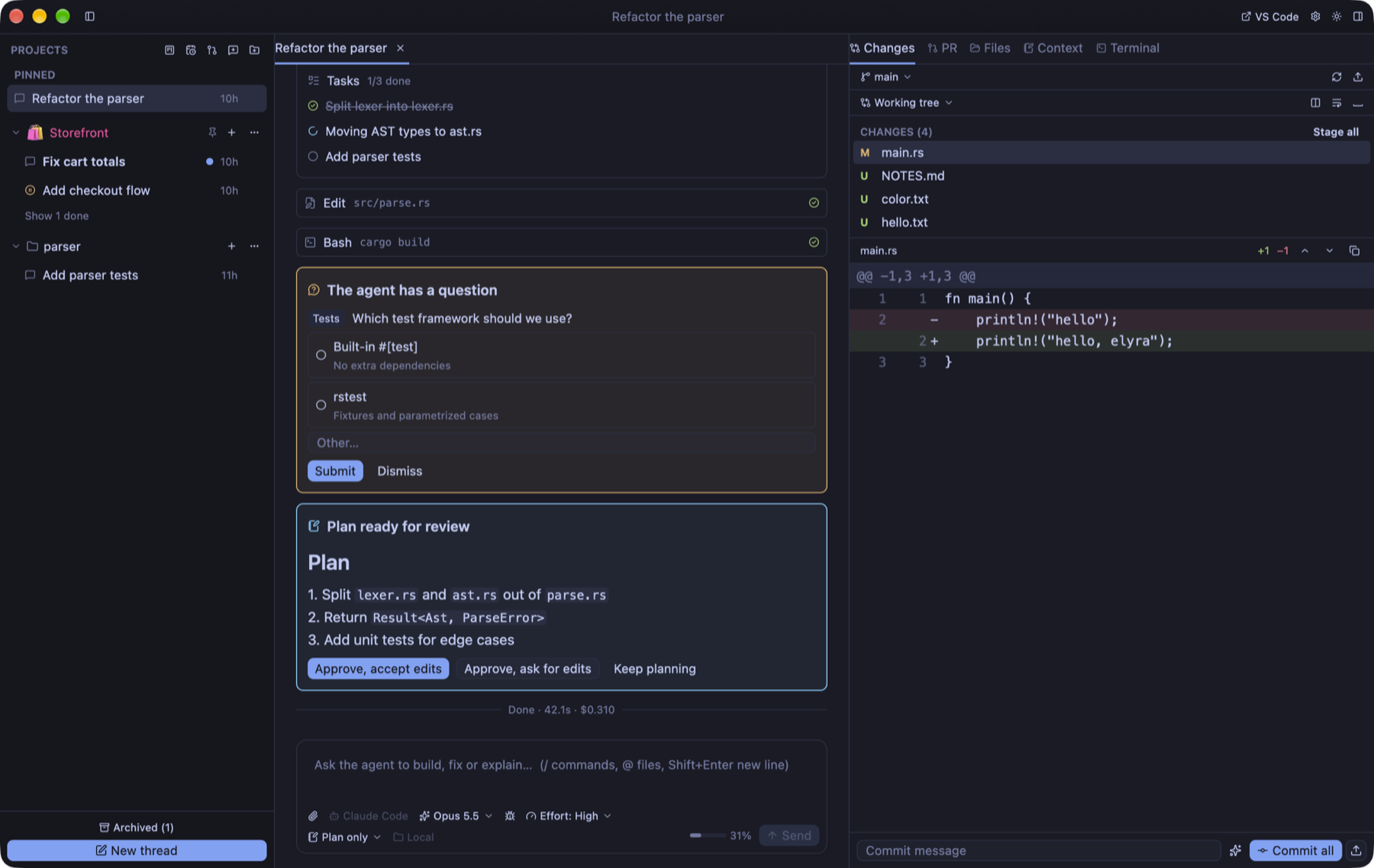
Threads · a task list · a question · a plan to approve · the diff
Download for macOS
One disk image. Open it and drag Elyra Workspace to Applications. The build is signed with a Developer ID and notarized by Apple, so Gatekeeper lets it through without a warning. From then on it updates itself: it checks GitHub at launch and every six hours, and installs only a build whose checksum matches, that is signed by the same team as the copy you run, and that Gatekeeper accepts.
Apple silicon, macOS 12 or later. That is the only platform it supports, so no Intel build is offered. It cannot replace itself when run straight from the disk image, so move it to Applications first; building it yourself is covered in the docs. Once it is installed, Help → Elyra Workspace Documentation (or Documentation in the command palette) opens the user guide on this site.
Bring the agent
you already use.
Elyra Workspace drives the command-line tools you install yourself and has no API keys of its own. Sign-in, billing and limits stay with each tool, and your messages and files go to the agents you use, under their own terms.
| Agent | How it connects |
|---|---|
| Claude Code | claude (stream-json) |
| Codex | codex app-server |
| Elyra and Pi | --mode rpc |
| Gemini CLI, Cursor Agent, OpenCode | Agent Client Protocol |
| Any other ACP agent | the command you set |
The agents are not all alike, and the providers page says where: effort levels, approvals and forking differ per agent.
The work, the changes,
and the review.
An agent is easy to start and hard to keep track of once there are five. A workspace keeps each task in a thread of its own, and keeps what the agent did next to the place you decide whether to keep it.
A thread for every task
Add your project folders and give each task its own thread, in tabs or a split view. Side chats for a quick question, fork to try another approach, and hand a task to another agent. A thread can work in the project folder or in its own Git worktree.
The agent's work, in view
Replies stream in. Tool calls show their live output and diffs; task lists, plans, questions and approvals are cards you act on, not text you have to find. The agent asks which test framework to use, you pick one and press Submit.
A checkpoint before every turn
Each turn starts with a checkpoint you can restore. They are hidden Git references inside the project's own repository, so there is nothing else to clean up, and deleting a thread removes them.
Git and review, beside it
Staging, generated commit messages, per-turn diffs and blame in the same window. Leave line comments for the agent to act on, and read pull requests and a code review inbox through gh.
Files, a terminal and a browser
A command palette, file and content search and an editor, a full terminal for vim, htop or lazygit with splits and search, and a browser tab (⇧⌘B) for the app you are building. With the agent gateway on, agents can open your local dev server in it and read the page, but only pages served from this Mac, and they cannot click, type or run scripts in it. No second window to keep up with.
Goals that keep an agent going
Write a goal such as all tests pass and the checkout handles discounts, and Elyra sends the agent on turn after turn until it ends a reply with GOAL ACHIEVED. It pauses when the agent says GOAL BLOCKED because it needs you or a turn fails, and stops when the turn budget runs out: 10 automatic turns by default. Permission requests still wait for you while a goal runs.
Scheduled prompts and a task board
An automation sends a prompt to an agent on a schedule — nightly test runs, dependency updates, a weekly summary of open issues — while the app is open, and a run that came due while it was closed starts shortly after you open it again. The task board is a Kanban of Draft, In progress and Done, and Start hands a task to an agent in a new thread named after it.
An agent gateway, with an audit log
Let agents start and steer other threads — Claude Code, Codex, Elyra (0.9.46 or later) and ACP agents get the gateway as an MCP server, Pi does not yet — or connect Claude Desktop and Codex to the workspace. Every call is recorded in an audit log, and the server listens only on 127.0.0.1 and requires a token.
Local and private
No account and no telemetry. Data lives in ~/.elyra, and the agents run as the command-line tools you install yourself. The only requests the app makes itself are the update check and update downloads from GitHub; the browser tab loads the pages you open in it, like any browser.
It does not pretend
the agents are the same.
Claude Code is the most complete
Its slash commands, skills and subagents appear under / and @, plan mode shows the plan as a card, and the questions it asks arrive as forms. Elyra and Pi run their tools directly, without approvals. And the agents driven over the Agent Client Protocol fork by sending the earlier conversation along with the first message, instead of branching their own session.
Text from outside is reference, not orders
Pull requests, issues and other text that comes from outside the project are marked for the agent as reference and not as instructions. The gateway server listens only on 127.0.0.1 and requires a token, and every call it takes is in the audit log.
It checks what it installs
A downloaded update must match its SHA-256 checksum, be signed by the same Developer ID team as the copy you run, be accepted by Gatekeeper as notarized, and report the version it should. If GitHub’s API limit has been reached (60 requests an hour per network, shared by everyone on it), the check reads the latest version from the release page instead. When it is ready you restart into it, and agents still working are stopped first, after asking, and can be resumed. Prefer to choose? Turn off the automatic download in Settings.
Free and open source.
No account, no telemetry.
Elyra Workspace costs nothing and asks for nothing: no licence key, no sign-in. The source is on GitHub under the MIT licence, and every feature on this page is in the download.
- Sends
- Nothing of its own: no telemetry. The only requests it makes itself are the update check and update downloads from GitHub; the browser tab loads the pages you open in it. Your messages and files go to the agents you use.
- Stores
- Everything in ~/.elyra: a SQLite database of projects, threads and settings, worktrees it created, your themes and shortcuts.
- Keeps apart
- Set ELYRA_HOME to run a separate copy with its own data, to try something out.
Five agents running.
One place to look.
Download Elyra Workspace, add a project, and start a thread for the next task. The diff is already beside it.