Its own Linux VM
The edock daemon serves the Docker Engine API and owns a Linux VM of its own, and the container runtime runs inside it. It boots the first time something needs it, in about 0.15 seconds; after 60 seconds with nothing to do it goes to sleep, and the engine itself then uses about 15 MB of memory. Memory the containers don't use is given back to macOS while the VM runs, and all of it when the VM sleeps.
The Docker Engine API
eDock's engine speaks the Docker Engine API on a unix socket, so the docker CLI, Compose, buildx and the tools that talk to Docker work unchanged. Engine › Command line › Set up runs edock setup: it brings the docker CLI with Compose and buildx, no package manager needed, and switching between eDock and another engine is then docker context use edock. Since 0.4.0 the first time eDock opens it walks you through getting set up, each step one click and each one skippable: start the engine, set up the terminal, bring your images, volumes and containers over from OrbStack or Docker Desktop, and trust HTTPS; ⌘K › Welcome shows it again any time. Since 0.6.5 docker cp works as it does with Docker: docker cp container:/folder/. here/ copies the folder's contents, where it copied the folder itself, and files copied into a container keep the owners the archive gives them, where every file became root's.
Containers, grouped by project
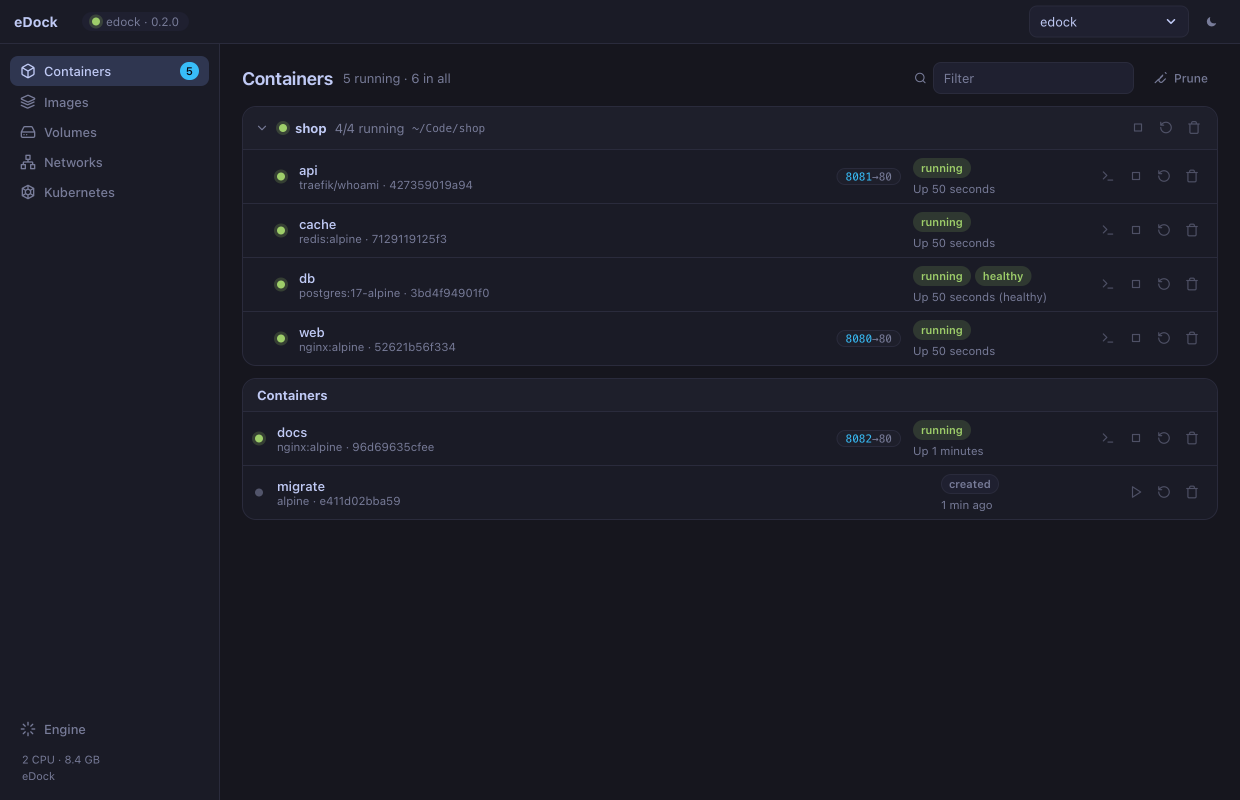
Containers that Docker Compose made are grouped under their project, with each container's service name and the project's folder; the rest come after, the running ones first. Filter by name, image or project, and Prune removes every stopped container. Each one has its logs, live stats (memory counted as docker stats counts it) and a terminal. Since 0.3.0 every running container has an address at eDock's router, http://<name>.edock.localhost (or <service>.<project>… for Compose), which reaches its web port even when nothing is published; the Ports tab finds ports it listens on that nothing publishes and publishes them with one click while it runs; Inspect › Environment › Edit restarts it with new variables and keeps its files; and Engine › Domains › Trust HTTPS gives those names a padlock, with certificates that can only vouch for eDock's own names. Since 0.3.1 eDock's own containers, the Linux machines, the Kubernetes node and BuildKit, stay out of the list unless eDock's own in the header shows them, and the environment editor keeps a value over several lines, such as a PEM key, exactly. Since 0.5.0 a container's Files tab browses its folders, previews files, saves a file or a folder as a .tar to the Mac and takes files dropped on the window, with any image on eDock, even without a shell, and since 0.6.2 a container's volumes and bind mounts as it sees them; and New service starts PostgreSQL, MySQL, MariaDB, Redis, MongoDB, RabbitMQ, Mailpit or MinIO for development: data in a volume, its port on your Mac, the connection string copied. Since 0.6.1 also ElyraSQL, MySQL-compatible, one file, with vector search; SQL Anywhere, SQLite over HTTP and WebSockets; and Askr, a PHP 8.5 app server for a project folder on your Mac, with Laravel in worker mode, which since 0.6.2 serves only project folders (/Users, /Volumes and the temporary folders, never /etc or /var). Since 0.6.0 a Compose project's header has all its logs as one, in time order, each service in its own colour; Rebuild & up, docker compose up -d --build --remove-orphans (a service you took out of the Compose file is removed) from the project's own files and folder; and its folder, a click from Finder, Terminal or your editor. A macOS notification says when a container runs out of memory or turns unhealthy, at most one per container every ten minutes. And 0.6.1 fixes a container started while eDock measured disk usage (the Volumes page, docker system df), which could fail at once with exit code 127 or hang before its program ran.
Images, volumes and networks
One row per image tag. Pull asks for a reference, nginx:latest or ghcr.io/org/app:1.2, and pulls it with progress, using the credentials from docker login; Prune dangling removes untagged images, Prune unused every image no container uses. Volumes and networks are listed beside them. Since 0.3.0 an image shows its layers, what each Dockerfile line added and which came with the base image, and its known vulnerabilities, found by Grype straight from eDock's store without starting the VM, by severity with the versions that fix them, and the SBOM as CycloneDX. The first scan downloads the scanner and its database: about 200 MB, and about 3 GB on disk. Since 0.4.0 a Builds page lists every docker build on eDock, with its status, steps, how much came from the cache, and how long it took; a failed build shows its error and the failed step at the top. Since 0.6.0 a volume's files open without a container (browse, preview, save to the Mac, put files in, remove), and volumes can be cloned, and exported to one .tar and imported again, owners kept; and a completed build shows the image it made, its size against the last build of the same name, with Inspect image and Scan.
Kubernetes and Linux machines
eDock runs a single-node Kubernetes cluster (k3s) in the same VM when you start it: pods, services, pod logs and a shell in a pod in the app, and kubectl with a context of its own. Start, stop and delete it from the app, or from a terminal with edock k8s start | stop | delete. And since 0.3.0 a Machines page keeps long-lived Linux environments with your Mac user, passwordless sudo and /Users at the same path: Ubuntu, Debian, Alpine, Fedora, Arch, Rocky or openSUSE, optionally with systemd, ready in seconds, with edock machine shell <name> from the terminal. In 0.3.0 a stopped Linux machine or a stopped Kubernetes cluster was deleted with everything in it by Prune on the Containers page or by docker container prune; since 0.3.1 they're left alone. After updating, press Restart engine on the Engine page: the fix is in the engine. Since 0.4.0 a ClusterIP service's ports have Forward, which opens the service on localhost like kubectl port-forward, without kubectl. Since 0.6.0 new machines can use the Mac's SSH agent (on by default), so git and ssh in them use your Mac's keys, which never leave the Mac.
amd64 images, through Rosetta
Images built only for amd64 run through Rosetta inside the VM, and --platform linux/amd64 is honoured; amd64 build steps run through it too. Most official images have an arm64 build, and those run natively.
In the menu bar
eDock lives in the menu bar. Closing the main window hides it and eDock keeps running there, with no Dock icon while no window is open. Quitting leaves the engine as it is, so docker keeps working while the app is closed.
Engine and contexts
The VM uses the CPUs and memory in ~/.edock/vm.json from its next start, or EDOCK_CPUS and EDOCK_MEMORY_MIB. Pulls, pushes, searches and logins go through macOS's own proxy settings by default, a proxy of your own or none, from ~/.edock/proxy.json. Since 0.3.0 the Engine page has tabs: Resources, with what the containers, the VM and eDock itself use now; Domains; and Builds & import, with docker build's cache, import from OrbStack or Docker Desktop (only read; containers arrive stopped) and a diagnostics report. Since 0.4.0 Engine › Network gathers container domains, HTTPS and the proxy: macOS's settings, a custom proxy or none, optionally passed to new containers as HTTP_PROXY, HTTPS_PROXY and NO_PROXY. Since 0.5.0 Engine › USB (beta) hands a serial adapter, Zigbee stick or development board to eDock's containers (--device), and gives it back. Since 0.6.0 Engine › Builds & import also chooses what docker build uses, docker's context or eDock always, runs a speed test of how long a container takes on eDock and on the other engines on your Mac, and shows the engine log.
An MCP server for AI agents
Since 0.5.0 eDock is an MCP server: an agent in Claude Code, Claude Desktop, Cursor or VS Code can see your containers, read their logs, check ports and image scans, and run commands in throwaway containers, which have no network unless the agent asks, stop after 60 seconds and are removed afterwards. Looking is free; anything that changes something (start, stop, pull, run, exec) is asked in the agent's app first, and nothing happens if you say no. Agents can't create or remove volumes or networks, or change the engine's settings. Engine › AI agents shows the exact command for this Mac.
Requests, inspected
Since 0.5.0 Requests shows each HTTP request to your containers through their domains, http://<name>.edock.localhost and https://…, with what the container answered: method, URL, headers, bodies, status and timing, with no proxy or setup in the app you're testing. Filter, copy one as curl, or replay it. Recording is off until you turn it on; the engine keeps the last 300 requests in memory and writes nothing to disk.
Snapshots
Since 0.5.0 a snapshot keeps a container's files, or a volume's, as they are now, so you can go back to them: take one before an upgrade, a migration or anything risky. Restore makes the container again with the same name and settings, and keeps the one it replaces, renamed; since 0.6.3 a Compose service's container is kept as a snapshot instead (Before restoring …), so Compose never sees two of the same service, and volumes, including the anonymous ones an image declares (a database's data), stay with the restored container. A container's volumes aren't in its snapshot, so snapshot a database's volume too. Works on any engine the app shows: eDock, OrbStack, Docker Desktop and the rest.
Updates it checks first
eDock fetches a new version from its GitHub releases and installs it only if its signature checks out: the download is signed with eDock's update key, whose public half eDock carries, and the app inside is signed with eDock's Developer ID and unaltered since it was signed. It replaces itself only in a folder you can write to, normally Applications.