Four small upgrades that make the database feel like home
A cozy look at Elyra Conductor 0.4.1 — PostgreSQL, per-column filters, editable cells, and a structure view. Why each one earns its keep, and how it works.
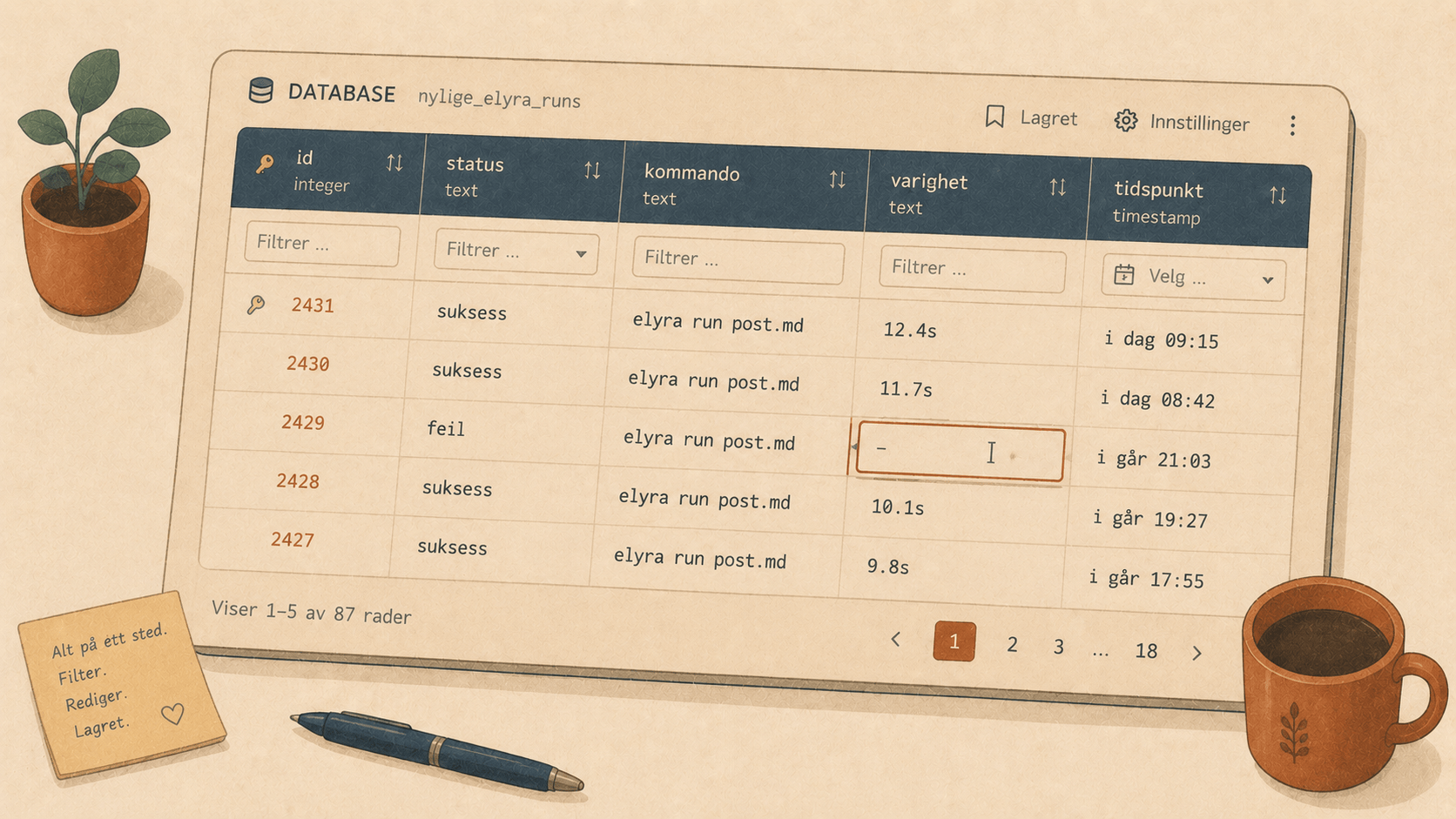
Last release we moved the database into the cockpit — connect from .env, browse tables, run queries, export to Excel, all without tabbing away. It was lovely. And then, the way it always goes, using it every day surfaced the four little things that were missing. Not big features. The small comforts that turn "this is handy" into "I don't think about it anymore."
So 0.4.1 is four of those. Let me walk you through them.
1. Postgres comes to the party 🐘
MySQL and SQLite covered a lot of ground. But plenty of projects — especially the Rails-ish and modern Laravel ones — run on PostgreSQL, and "the database browser doesn't know my database" is a quiet dealbreaker.
Now it does. Set DB_CONNECTION=pgsql and Conductor connects on 5432, same one-click flow as the others. Or pick PostgreSQL in the manual form.
DB_CONNECTION=pgsql
DB_HOST=127.0.0.1
DB_DATABASE=app_dev
DB_USERNAME=postgres
The neat trick under the hood
Postgres is famously fussy about types — timestamps, numeric, uuid, jsonb, arrays. A naive browser drowns trying to decode every column into the "right" Rust type. So we sidestepped the whole problem: Conductor talks to Postgres over its simple query protocol, which hands back every value already rendered as text.
That means an arbitrary SELECT — with a weird jsonb column, a tstzrange, whatever — just works. No "unsupported type" walls. The browser shows you what psql would show you.
(Phase note: this connects without TLS, which is right for local/dev. Remote-over-TLS is a later addition.)
2. Per-column filters 🔎
The global WHERE box is great when you know exactly what you want. But most of the time you're exploring — "show me the Oslo rows," then "okay, only the ones with a non-empty floor." Writing SQL for each nudge is friction.
So there's now a filter row right under the column headers. Type in a column, and Conductor narrows to matches:
city: Oslo zip: 04
Each box becomes a CAST(col AS TEXT) LIKE '%…%', combined with AND (and with the WHERE box, if you're using both). It's the spreadsheet instinct — filter where you're looking — applied to a real database. The ✕ clears everything and you're back to the full table.
It reads like this behind the scenes:
SELECT * FROM "addresses"
WHERE CAST("city" AS TEXT) LIKE '%Oslo%'
  AND CAST("zip"  AS TEXT) LIKE '%04%'
ORDER BY "city" ASC
LIMIT 100;
You never wrote that. You just typed in two little boxes.
3. Editable cells ✎
Here's the one that quietly changes how you work. You spot a row with a typo, or a flag that should be flipped on a staging record. Old way: open a query tab, hand-write an UPDATE, get the WHERE exactly right, hope you didn't fat-finger the id.
New way: double-click the cell. Type. Press Enter.
city: Oslo → Oslo S ⏎
Conductor builds the update for you, scoped to the row's primary key:
UPDATE "addresses" SET "city" = 'Oslo S' WHERE "id" = '34';
A few deliberate guardrails, because editing data deserves care:
It requires a primary key. Conductor detects the PK from the table's schema; if a table has none (or you're looking at a join result), cells stay read-only — there's no safe
WHEREto write, so it won't pretend there is.Esccancels,Entercommits, and a single click still just copies the value.PK columns are marked with 🔑 so you always know what identifies a row.
It's the difference between reading your data and working with it
4. A Structure view 🔑
Sometimes the question isn't "what's in this table" but "what is this table." What type is that column? Is it nullable? What's the key?
Flip the new Data / Structure toggle and you get exactly that — the columns laid out with their type, nullability, and key:
Column        Type            Nullable   Key
id            bigint          NO         🔑 PRI
ulid          varchar(26)     NO
city          varchar(255)    YES
zip           varchar(20)     YES
No DESCRIBE, no \d, no leaving the table you're already looking at. Just a toggle, and the shape of the thing is right there.
A two-minute tour
Open a Postgres project → DB → Connect from
.env.Click a table. Type
Osloin the city filter box. Watch it narrow.Double-click a cell, fix it, press Enter. Done — no
UPDATEwritten by hand.Flip to Structure to check that
zipreally is avarchar. (It is. That's why your leading zeros survive.)Still curious? + New query, write some SQL, ⤓ Excel the result, ⭐ Save the query (privately, per project).
Every one of those used to be a reason to tab away to another app. None of them is anymore.
Why these four, together
There's a theme to 0.4.1, and it's not "more database features." It's removing the reasons to leave. Postgres support removes "my DB isn't supported." Per-column filters remove "I have to write SQL to look around." Editable cells remove "I have to hand-craft an UPDATE for a one-character fix." The structure view removes "let me go check the schema somewhere else."
Each is small. Stacked, they mean you can open a project, poke at its data, fix a thing, check a type, and never once break the spell of being in your project. Which, in the end, is the only thing the cockpit is really for.
Open a table. Filter a column. Fix a cell. Stay right where you are. 🪵🔥
Elyra Conductor 0.4.1 adds PostgreSQL, per-column filters, inline cell editing, and a structure view to the database browser — with auto-update built in. As always, Conductor connects, lists, queries, and edits; it never reasons. Your credentials stay in your .env; your thinking stays in your tools.