Your data,
native and instant
.
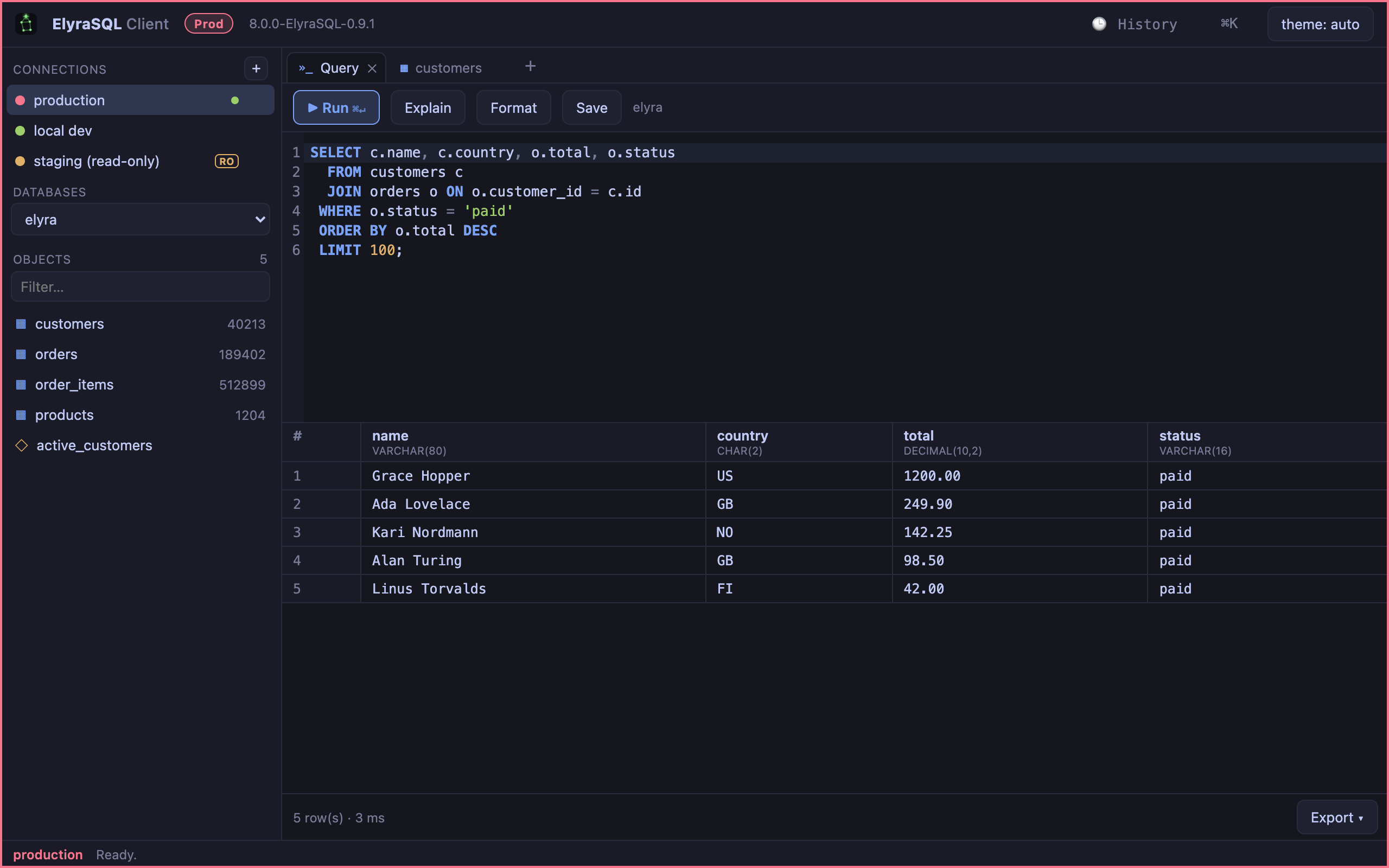
A fast, lightweight SQL workbench to browse, query, edit and model your data — a native app that starts immediately. First-class for Elyra SQL Server — and it speaks MySQL, MariaDB, SQLite and, since 0.10.0, ClickHouse.
Download the client
A single download for macOS (Apple Silicon) and Linux. It runs Free out of the box; a license key unlocks Pro or Premium at runtime.
Browse, query,
edit and model.
Everything you need for daily database work in one native window — safe by default, fast on millions of rows.
SQL editor
A CodeMirror editor with schema autocomplete, EXPLAIN, formatting, query history and saved queries — findable since 0.8.5, which is later than this line has implied. They were listed nowhere: reachable only through the command palette, which is to say not findable at all, and global, so a query written for one database showed up the same for every other. They sit under the database they were written against now, beside its Tables and Views, with the ones tied to no database in a section of their own so nothing appears twice. Three faults had to go before that section could work: the list was never fetched at startup, saving did not refresh it — so a query saved a moment earlier was absent until the next launch — and deleting one did not ask first. Since 0.10.1, when a query fails the server's message can be classified into a cause and the matching next step offered as a button — the table's columns for an unknown column, user administration for a missing privilege, the timeout setting for a statement that ran long, Try again when it looks like timing. The case that repays it most is this engine does not implement that: the SQL is valid elsewhere, nothing in the message says to rewrite it, and ten minutes go on a typo that is not there. It uses Jev, TypeSafe's judgment model, with your own key in the keychain, and returns a category rather than prose, which is what lets the answer become a button. What is sent is the error message and the engine's name — not the statement, not the schema, not a row. The hint sits beside the server's message and never replaces it, appears only when the classification was confident, and gates nothing: the write rails, the production confirmation and the read-only refusal are code, and have to work when the service does not.
An assistant beside the results
Since 0.9.0, ⌘/Ctrl+I opens a Pro panel docked beside the grid that writes, explains, optimises and migrates SQL against the database you have open — your own key from Anthropic, OpenAI or Google Gemini, billed to your account so you see what it costs, stored in the OS keychain beside your database passwords and never in a file or a log. What is sent is the part worth reading: the engine and dialect, the database, and table and column names unless you turn them off. What is never sent is row data — not the grid, not a sample, not a result. A column called ssn tells the model a column is called ssn; it does not tell it anyone's number. A CONTEXT strip along the top shows the scope in force before you ask, so you can see it rather than trust a description of it. The assistant never runs anything on its own: each statement arrives in its own block with copy, insert and run, and run goes through exactly the path a statement you typed would — a write against a production connection still raises its confirmation, a read-only connection still refuses it. A block that modifies data is marked writes before you touch it, deliberately: an assistant that could execute what it wrote would be one prompt injection away from a DROP, and the schema it reads can be influenced by anyone who can create a table name. On a very large schema the listing is capped and the assistant is told it is incomplete, so it asks about a table it cannot see rather than reporting that it does not exist. Quick actions on a query — Explain, Optimise, Fix — carry the SQL and the server's own error message, not your data. Turning the schema off leaves an assistant that still knows your dialect but will ask for names instead of guessing them.
Browse & edit
A virtualized grid stays smooth on millions of rows — no-SQL filters, foreign-key jumps and transactional inline editing with a SQL preview. On a table with no single-column primary key it now orders by every column when paging: LIMIT/OFFSET with no ORDER BY lets the server return rows in any order, and it need not be the same order across the two round-trips a second page takes — so rows were silently skipped or shown twice.
Visual query builder
Compose joins and filters visually and drop into raw SQL whenever you want.
Data modeling
An ER diagram and table designer to see and shape your schema (Premium). Since 0.11.0 the diagram shows every column with its type and role, lays itself out with referenced tables first, and draws column-to-column relationships with crow's-foot ends read from what the schema states — a nullable reference makes the parent optional, a unique one makes it one-to-one, and one-or-many is never drawn, because no schema requires a parent to have children. Where no keys are declared, which is every ClickHouse database and many MySQL ones, it infers them from naming (user_id → users.id), and never presents a guess as a key: dashed, marked fk?, labelled in every export and hidden by one switch. It exports to PNG, SVG, Mermaid, DBML and PlantUML, and can draw from pasted CREATE TABLE statements with no connection at all — nine dialects, parsed on the machine and sent nowhere, with a statement it cannot read skipped and counted rather than failing the paste.
Import & export
CSV export everywhere; CSV import and JSON / SQL / XLSX export in Pro and Premium.
Safe by default
Secrets live in the OS keychain, the read-only and production guards are enforced in one place — the connection broker — and a write cannot be issued without an authorization the compiler insists on. That last part is real: a new code path cannot reach the database without going through it. What it does not do is find the paths that were written before it, and three releases running have turned one up. 0.7.0: the write gate asked is this definitely a write?, so CALL, VACUUM, FLUSH and OPTIMIZE TABLE went unrecognised down the read path with no authorization at all — it asks whether a statement is positively known to be harmless now, which is the form that fails closed. 0.8.0: user administration passed confirmed: true unconditionally, so dropping an account skipped the prompt every data write gets. 0.8.2: deleting a connection removed the saved profile and its stored password on a single click, with no confirmation and no undo — and the safe action, disconnect, was hidden in a right-click menu while the destructive one held the visible spot. 0.8.5: Close, Open and Delete connection did nothing at all — each closed the context menu before reading the connection out of it, and the menu's data is derived from the menu being open, so all three threw on their second statement. Only Close was reported. The other two were the same bug, and after 0.8.2 had been about Delete being too easy to reach, Delete being harmless was luck rather than design. So: the guarantee is being reached path by path rather than by construction, and the honest version of this card is that each release has been finding one more.
It says so when it is not encrypted
TLS used to be opportunistic, so a session could fall back to clear text while still looking fine. The client now asks the server whether the session is actually encrypted and shows a lock when it is — or an unencrypted warning when a remote connection is not. Require TLS is on by default for any non-local host. Preferred means preferred again since 0.8.1: a server advertising TLS with a certificate the client would not accept could not be connected to at all, where the setting is supposed to mean encrypt if offered. It falls back to plaintext now — never when TLS is required — and an SSH tunnel counts as a remote connection whatever the host field says, because with a tunnel the host resolves on the bastion and 127.0.0.1 would otherwise read as local.
Server tools
Status, process list, users and backup for Elyra SQL Server, right from the client (Premium). Through 0.7.0 user administration was the one write that skipped the production-confirmation prompt: it passed confirmed: true unconditionally, on the reasoning that server configuration is not a data write — which had it backwards for dropping an account or granting admin. It goes through the same prompt as everything else now.
Tools menu
Database-wide utilities: Data Transfer and Data/Structure Synchronization (mirror rows or schema between databases with a reviewable diff, Premium), Data Generation (realistic test data, Pro), plus data dictionary, console, find-in-database, server monitor and history log. Transfer pages by keyset and streams into one transaction — ~1.8× faster with memory that stays flat whether the table has 20k rows or 600k. Two things about that were not true until 0.8.0, and both cost data. The truncate ran outside the transaction, so a failure part-way through left the target empty with no way back — which is the one thing one transaction is supposed to prevent. And binary columns were read through the same stringifying path the grid uses, which renders a BLOB as [N bytes]: transfer wrote that literal text into the target and reported success. Transfer and data sync refuse binary columns now rather than pretending to carry them.
Charts & profiling
Visualise any query result or table as a bar, line, area or pie chart, and right-click a column to profile it — row/null/distinct counts, min/max and top values. Both say when they are showing less than everything: a profile over 200k rows is marked as sampled, and a chart states when it is plotting a prefix of the loaded rows, because a graph that silently drops data is worse than no graph. Since 0.8.6 the chart can stop drawing a prefix at all: tick Aggregate in the database and the GROUP BY runs server-side over the whole table, or over your query wrapped as a derived table — the grid caps a query at 2 000 rows and the chart took the first 500 of those, so charting a multi-million-row table drew an arbitrary prefix and presented it as a distribution. Summarize on a table's context menu does the same from the other end, and shows the SQL rather than only the answer, because the query is the artefact worth keeping: it can be edited, saved or charted. A column profile can scan the whole column now instead of the first 200 000 rows, and reports how long either run took, which is what tells you whether it is worth asking again. Three limits found by probing the server rather than reading about it are stated where they bite: ORDER BY COUNT(*) needs the alias form, GROUPING() is missing so subtotals are only offered where position makes a rollup row unambiguous, and EXPLAIN said nothing about whether the parallel aggregation was used, so no client could show you when a query took that path or defeated it. All three were closed in ElyraSQL 1.11.3, and 0.8.7 is the client's half — verified by re-probing the running server, not by reading its release notes. EXPLAIN's aggregation line (parallel streaming, and when it spills) is lifted out and shown beside the result rather than left off the right edge of a twelve-column grid. Summarize emits GROUPING(), summed across every key into a level — leaf, subtotal, grand total — so subtotals are marked rather than guessed from row position, and are offered with a single grouping column now. ORDER BY COUNT(*) works on the server, but the generator keeps the alias form on purpose: it works on every engine this client speaks to, and switching back would cost portability for nothing. Subtotals are disabled on SQLite, which has neither WITH ROLLUP nor GROUPING(); that gap predates 0.8.7. Reporting the three is what closed them.
Works with SQLite
Connect to local SQLite files alongside Elyra SQL Server, MySQL and ClickHouse — the same workbench for every database on your machine.
ClickHouse, over HTTP on purpose
A fourth engine since 0.10.0: browsing, querying, the grid, export, charts, profiles and the assistant all work against ClickHouse, port 8123 or 8443 with Require TLS — the only one ClickHouse Cloud exposes. It is driven over the HTTP interface, not the MySQL-compatibility port, and that was the expensive choice: the shim would have cost almost no new code and reports every column as a string, so the grid loses the types it aligns numbers and renders dates by; it is absent on ClickHouse Cloud; and it offers no way to name a query so it can be cancelled. Over HTTP the grid gets real ClickHouse types, Stop works, and Statement timeout is enforced by the server, and since 0.12.0 a read-only ClickHouse connection is read-only on the server too: requests carry readonly=2, so ClickHouse itself refuses a write and not only the client. Row editing, the designer, structure and data sync and data generation are unavailable on ClickHouse, and refused rather than approximated: it has neither row-addressable updates nor transactions, and ALTER TABLE … UPDATE is an asynchronous rewrite of data parts that returns before the change is visible and cannot be rolled back — something other than what those buttons say. SQL you write yourself still runs, DDL and INSERT included. Introspection reads system.* rather than INFORMATION_SCHEMA, which on ClickHouse calls every object BASE TABLE and gives no row counts. And one thing the first engine to send Decimal as a bare JSON number found: those went through an f64, so Decimal128(10) holding 1234567890.1234567890 came back with its last digits silently gone, on exactly the columns a financial dataset cares about. Cells keep the server's own digits now.
A production write says what it will touch
The confirmation on a production connection used to show the statement and ask are you sure, which nobody can answer about a DELETE with a date in its WHERE without knowing whether it means forty rows or forty million. Before it asks, the client counts: Deletes 1,204 rows from orders, with the first five of them underneath, and in red when there is no WHERE at all. The count is a SELECT COUNT(*) reassembled from the statement's own table and WHERE, bounded to five seconds. The write is deliberately not run in a rolled-back transaction to count it: a rollback does not undo a trigger's side effects or an AUTO_INCREMENT already consumed, and it would hold the write's locks on a production table while you read the dialog. UPDATE, DELETE, TRUNCATE and DROP TABLE are counted; a multi-table UPDATE … JOIN is reported as not counted, with the reason, because a count of the join would look authoritative and not be.
Extract a slice
Premium, since 0.12.0. The rows a condition picks out of one table, plus every row their declared foreign keys point at, so the slice loads on its own, and optionally the rows that point at them: a customer, their orders, those orders' lines, and only the products on them. Keys are followed upwards from every row but downwards only from where you started, never back out through a shared parent, which is what keeps one customer from pulling in the whole database. It is written to Downloads as a self-contained SQLite file (Open as connection adds it to the sidebar) or as INSERTs in parent-first order for a database that has the schema. The source is only read. Binary columns are refused by name, and the slice stops at 100,000 rows rather than quietly dropping any. The .sql output switches foreign key checks off while it loads on MySQL, MariaDB and SQLite, where a key cycle would otherwise have no order that loads.
Agent access over MCP
Pro, since 0.12.0. elyrasql-client --mcp is an MCP server: Claude Code and other agents can list, describe and read the connections you tick in Settings, Agents, by name, with the password staying in the keychain. It is separate from the assistant, which never sees a row: this one does read rows, because that is what you tick a connection for, and nothing is shared until you tick it. Reads only, and enforced in layers: the statement is parsed and must be one SELECT, WITH, EXPLAIN, DESCRIBE or SHOW with no INTO, locking clause or executable comment; functions that reach outside the database are refused by name, and on ClickHouse only an allow list of table functions that stay on the server is let through; the connection is opened read-only; on the MySQL-wire engines each read runs in START TRANSACTION READ ONLY and is always rolled back; and every read stops after 30 seconds and returns at most the rows you allow. Every agent query is in your History, marked agent. One honest note about the server: ElyraSQL accepted START TRANSACTION READ ONLY without enforcing it up to 1.12.0, so an INSERT inside one succeeded and the rollback was what undid it, where MySQL and MariaDB refuse the write outright. From 1.12.1 it refuses the write too, and the rollback stays as the second layer.
Automatic updates
Update & restart downloads a signature-verified build and installs it in place, then relaunches — no drag-to-Applications step. The swap runs without a shell, and moves the old version aside first: if the copy fails, the previous version is put back, so a failed update never leaves you without a working app. Signature verification arrived in 0.8.0 and is worth being exact about: until then the check was a SHA-256 taken from the same manifest as the binary, which proves the download arrived intact and nothing about who wrote the manifest. Each artifact now carries an ed25519 signature checked against a key bundled in the app, an update without one is refused outright — a missing signature is exactly what rewriting the manifest produces — and the dialog reports what it actually verified rather than implying more. The same release stopped the chain accepting an empty checksum, stopped it stripping the download quarantine attribute, and refused downgrades. And 0.8.7 fixes RUSTSEC-2026-0285 in rustls, reached through ureq — the TLS stack this updater fetches signed artifacts over — by a lock-only bump to 0.23.45, with the network smoke test run against the real manifest over HTTPS to confirm the updater still works.
Native & instant
A small Rust + Svelte 5 binary that starts immediately — no heavyweight runtime.
Built for Elyra SQL
First-class support for the server's dialect, catalog and admin surface — and MySQL and MariaDB are in the engine list since 0.8.1. I wrote here two days ago that the places they differ were handled explicitly rather than assumed away; 0.8.3 is the second release since to find that they were not. Picking a database set interface state and sent no USE, so a query ran against no database at all while the navigator showed the tables — and TIMESTAMP columns rendered as blank cells, not NULL, because the decode failed and fell through to an empty string, so a broken column looked like an empty one. Before those, metadata arriving with a binary collation had the object list showing database names as [21 bytes]. Three basic things in three releases; the engines work now, and the claim that they were carefully handled from the start was mine to check and I repeated it. SSH tunnelling arrived with them (Pro): it drives the ssh already on your machine rather than reimplementing it, so ~/.ssh/config, known_hosts, ssh-agent, hardware keys and ProxyJump all apply — and host key verification stays OpenSSH's job, because a tunnel that accepts any host key is a man-in-the-middle path into a production database that looks like it works. Worth knowing if you run both: 0.6.0 could not connect to ElyraSQL Server 1.9.4 at all. sqlx opens every MySQL connection with a compatibility preamble the server rejects two parts of, neither of which this client needs. 0.7.0 drops them — and with them the pinned UTC session, so TIMESTAMP values now arrive in the server's timezone. There is nothing to choose between there: the server offers no way to set it.
One download, three tiers.
Runs as Free with no license. A key unlocks Pro or Premium at runtime — gates are enforced in the core, so locked actions show the tier they need. Prefer to pay once? Grab the limited-time lifetime license below.
- Local connections, browse & run SELECT
- Query history, saved queries, SQL format
- CSV export
- Everything in Free
- Remote connections
- Writes / DDL, inline editing, filters, FK jump
- CSV import · JSON / SQL / XLSX export
- Visual Query Builder
- AI assistant — Anthropic, OpenAI or Gemini, your own key; row data never sent
- Agent access over MCP, read-only, on the connections you tick
- Everything in Pro
- ER diagram & table designer
- Extract a slice that still holds together
- Backup & server tools (status, processes, users)
All of Premium, forever.
One payment, every Premium feature and all future updates — no subscription. A limited-time launch offer.
Lifetime license
Licenses validate online, with a 14-day offline grace period. See the editions & licensing guide.
A workbench
that starts instantly.
Free to browse and query. Explore the whole SQL family.