The First Honest Look
One page, one question, one score. This chapter is about the launcher and about reading a report properly: which numbers are causes, which are symptoms, and why the objective you pick changes what the score even means.
The problem
An audit that reports everything reports nothing. Point a generic crawler at a site and it returns a few hundred findings sorted by nothing in particular, where “missing canonical on your one duplicated page” sits below thirty cosmetic warnings. The information is all there and the priority is absent, so people fix what is easy instead of what is wrong.
The reason is that a generic audit has no idea what you are trying to achieve, and the signals that matter depend entirely on that. A page that needs to be indexed by Google and a page that needs to be quoted by ChatGPT are two different jobs with two different weightings.
The launcher, in reading order
Sjá's launcher asks for the objective first, the URL second, and then RUN — in that order because it is the order you think in.
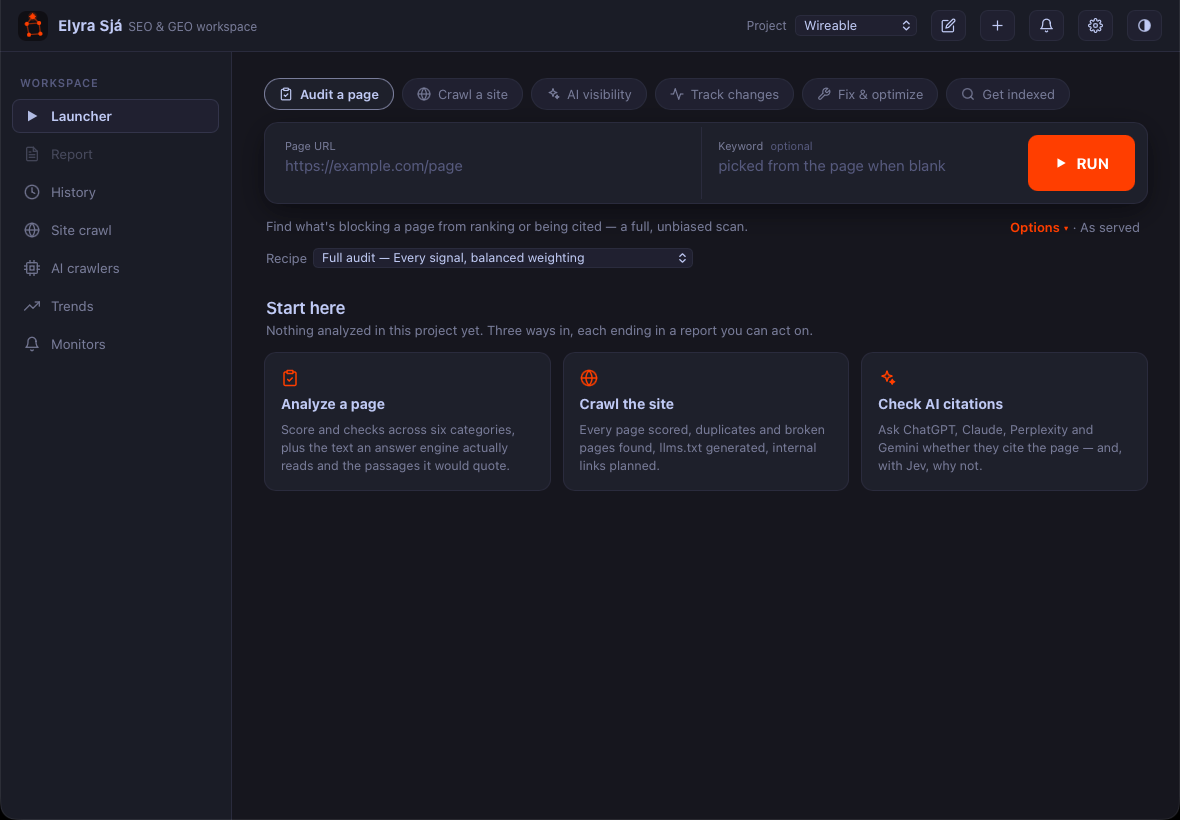
The objective decides what RUN does, not merely how the result is weighted:
- Audit a page — a full, balanced scan. Every signal, no thumb on the scale. Start here.
- Crawl a site — RUN starts a crawl instead of a single analysis (chapter 8).
- AI visibility — runs the analysis and opens the report at the citation probe, with the GEO signals weighted heavily (chapter 10).
- Track changes — runs the analysis and creates a monitor for the page, so a page you wanted watched is watched from the first run rather than from the day you remember to set it up (chapter 12).
- Fix & optimize and Get indexed — the same analysis, weighted toward what each goal needs (chapters 5 and 6).
The keyword is optional, and leaving it blank is often the better first move: Sjá then picks the page's own main term. If what it picks is not what you thought the page was about, you have learned something before reading a single score.
The six categories, and what each is for
Every check belongs to a category, and each category answers a different question. Knowing which question lets you read the score bar as a diagnosis instead of a report card.
| Category | The question it answers |
|---|---|
| Meta | Does the page introduce itself? Title, description, canonical, headings. |
| Structure | Can a machine parse the shape of it? Heading order, semantics, images, links. |
| GEO / AI | Can an answer engine reach it, read it, and quote it? (chapters 4, 6, 7) |
| Social | Does it survive being shared? Open Graph, Twitter cards, image dimensions. |
| Indexing | Is it allowed to be indexed at all? robots, noindex, canonical conflicts, sitemap. |
| International | If you serve several languages, do they point at each other correctly? |
With a PageSpeed key there is a seventh, Performance, carrying Core Web Vitals from Google's own field data — real measurements from real visitors rather than a simulation on your laptop.
Reading the report without panicking
Freddy's first run comes back 61, grade D. The instinct is to start at the top of the issue list and work down. Resist it, and sort by cause instead.
First, look at Indexing. It is the only
category that can make every other number irrelevant. A
page carrying noindex, or canonicalised to
somewhere else, or disallowed in
robots.txt, will not be indexed no matter how
good the rest is. If Indexing is red, nothing else on the
page matters until it is green.
Then look for the single findings that explain several others. Freddy's report shows a missing description, a weak social preview and a low GEO content score. These look like three problems. They are one: the page has no summary sentence anywhere, so there is nothing for the description, nothing for the Open Graph card, and nothing for an engine to quote. One paragraph fixes all three.
Only then do the cosmetic items. Alt text on decorative icons is real but small. It is the last hour of the work, not the first.
What you learned
- Objective first. It decides what RUN does — crawl, probe, monitor — and which signals carry weight.
- Leave the keyword blank once. What Sjá picks as the page's main term tells you what the page is actually about.
- Indexing is the gate. If it is red, every other category is theoretical.
- Sort findings by cause, not by list order. Three symptoms with one cause are one afternoon's work.
- Every finding carries the value it found, so you can check it rather than believe it.