Ask the Grid: Natural-Language Filtering Lands in Elyra DataGrid 0.2
Elyra DataGrid 0.2 lets users filter a table by typing a sentence. The model never touches your database — it only produces a filter the grid already allows.
Type what you mean. Get the rows you want. No query language required.
There's a small, quietly frustrating moment that happens a hundred times a day in every admin panel on earth. Someone opens a big table, they know exactly what they're looking for — "the paid orders from up north that broke fifty grand last quarter" — and then they stop. Because now they have to translate that perfectly clear thought into clicks: open the filter row, pick a column, pick an operator, type a value, add another condition, remember where the AND/OR toggle lives, fiddle with a date range…
The thought was clear. The doing was tedious.
Elyra DataGrid 0.2 removes that friction. You can now just ask the grid, in plain language, and it figures out the filter for you.
The one-line demo that sells itself
Enable it, type a sentence, press Enter:
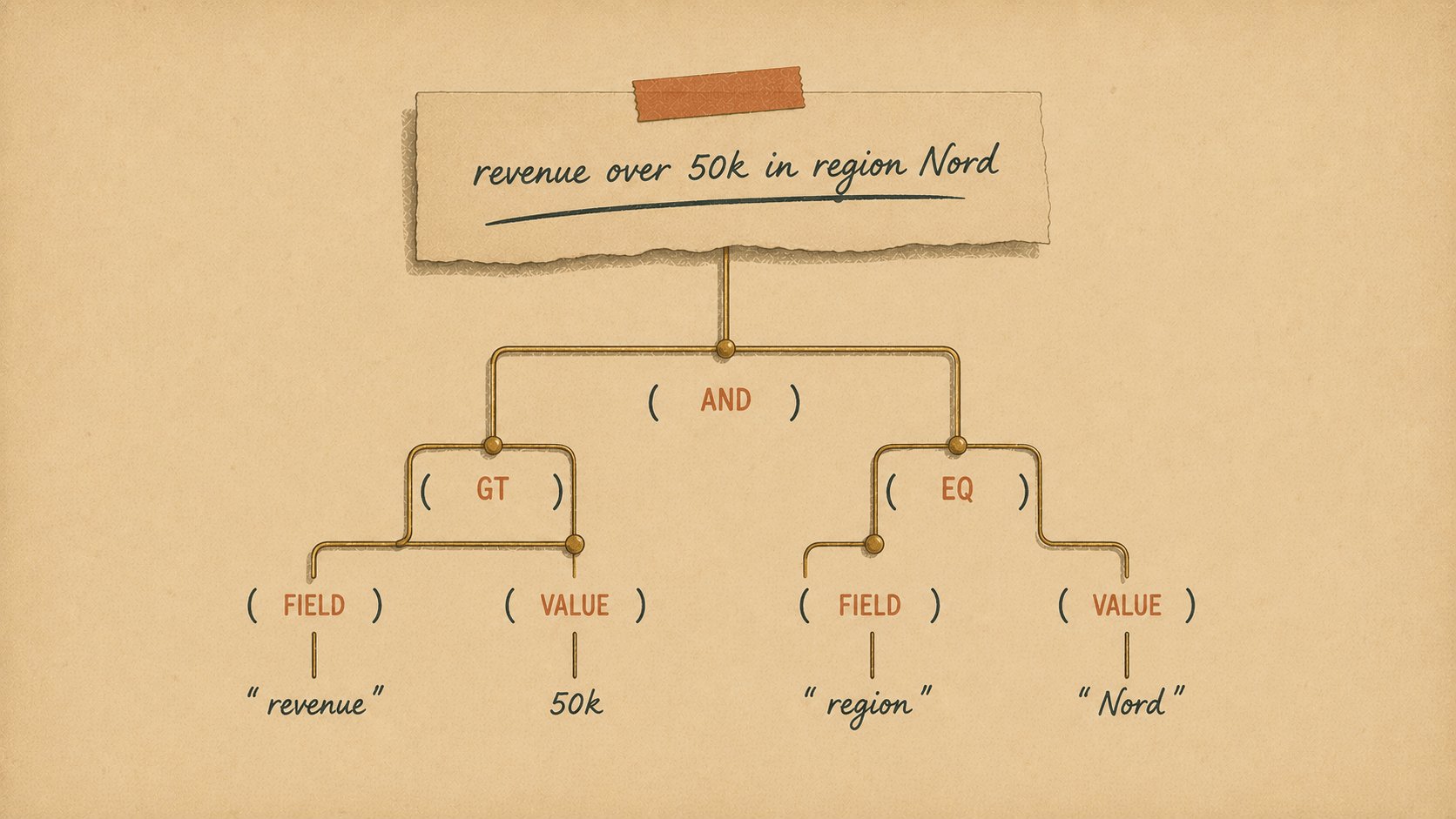
> revenue over 50k in region Nord
…and the grid applies:
region = "Nord" AND revenue >= 50000
Try something with a genuine or in it:
> paid or shipped orders in Oslo
…and you get a properly nested tree — not a flat mush:
region contains "Oslo"
AND ( status = "paid" OR status = "shipped" )
No query syntax. No "did I put the parenthesis in the right place." You said what you wanted, and the grid built the filter — parentheses, operators, values and all.
Why we built it (and why it isn't a gimmick)
Plenty of products have bolted a chatbot onto a table and called it AI. That's not what this is.
The magic here isn't that an LLM is involved. The magic is where it sits. The model never touches your database, never runs SQL, never sees a single row. All it does is turn a sentence into a filter description — and that description then flows through the exact same validation and compilation path as a filter a user built by hand.
Which means the feature inherits every safety guarantee the grid already had:
Only your declared columns exist. The model is handed a schema built from your grid's own filterable columns and the known operator set. It literally cannot name a column you didn't expose.
The output is re-validated server-side. Anything off-target — an unknown field, a made-up operator — is quietly dropped before it goes anywhere.
Values are always bound. The result compiles through the ordinary filter compiler: columns allow-listed, values parameter-bound. There is no path from "user sentence" to "raw SQL."
No data leaves. The model sees column names, types and declared option values — never rows.
We like to put it this way: it's safe by design, because the model can only ever produce a filter the grid already allows. The AI is a convenience layer on top of a boundary that was already locked down. If the model has a bad day and hallucinates, the worst case is a dropped condition — never an unsafe query.
That's the difference between "we added AI" and "we added AI we'd actually ship to production."
How it works, end to end
Here's the whole journey of a question:
"revenue over 50k in region Nord"
        │
        ▼
  GridAssistant  ──►  builds a JSON-schema from YOUR columns + operators
        │
        ▼
  laravel/ai  ──►  LLM returns a structured filter tree (constrained output)
        │
        ▼
  re-validate against the allow-list  (drop anything unknown)
        │
        ▼
  FilterGroup  ──►  FilterCompiler  ──►  bound, allow-listed SQL
On the server it's a single method:
$filter = $grid->ask('revenue over 50k in region Nord');
// → a validated FilterGroup, ready to hand to respond()
That's it. ask() returns the same FilterGroup the protocol already uses everywhere, so it slots straight into a request:
$request = new GridRequest(
    columns: ['id', 'region', 'revenue'],
    view: new Viewport(skip: 0, take: 50),
    filter: $filter,
);
return $grid->respond($request);
It reads your columns — including your enums
The assistant builds its prompt from the grid definition, so it knows that status is one of paid | pending | shipped | delivered | returned, that revenue is numeric, and what today's date is (so "last quarter" becomes real between bounds). You don't teach it your schema — your grid already declared it.
It's testable without an API key
Because the safety-critical part is the validation and assembly — not the model call — the LLM sits behind an injectable engine. In tests you hand it a canned response and assert the tree is built and sanitized correctly. No key, no network, no flakiness. (We ship 19 assertions doing exactly that, proving unknown fields get dropped and the output compiles to bound SQL.)
Turning it on in each client
It's opt-in everywhere, and it's one line.
Livewire + Flux — add a property, and an "ask in plain language…" box appears in the toolbar:
class SalesGrid extends DataGrid
{
public bool $assistant = true;
}
Vue & Svelte (Inertia) — pass an ask function that hits an endpoint; the box shows up automatically:
const options = {
// ...
ask: async (q) => (await axios.post('/api/sales/ask', { q })).data.filter,
};
Route::post('/api/sales/ask', fn (Request $r) =>
response()->json(['filter' => salesGrid()->ask((string) $r->input('q'))]));
Same feature, same guarantees, three clients — because they all speak the one protocol underneath.
The prerequisites (they're modest)
This is an optional capability, so it stays out of your way until you want it:
composer require laravel/ai
ANTHROPIC_API_KEY=sk-ant-...     # or OpenAI, Gemini, Groq, …
ELYRA_DATAGRID_ASSISTANT=true
No laravel/ai, no key? The grid behaves exactly as before, and the ask box degrades to a gentle "couldn't translate that — try rephrasing." Nothing breaks; the feature just isn't there.
Also in 0.2
The headline is natural-language filtering, but the release also carries a round of hardening: request guard rails (bounded page depth, filter nesting, IN-list size, export caps), an enforced aggregatable flag, LIKE-wildcard escaping, an authorize() gate on writes and exports, and a repaired Svelte client with full column virtualization. The kind of unglamorous work that makes the glamorous feature safe to lean on.
Give it a sentence
The best demos are the ones where you don't have to explain the demo. Open your grid, type "returned orders over 5000 in the west," and watch the filter build itself — correctly, safely, in the language your users already think in.
That's Elyra DataGrid 0.2. Stop building filters. Start asking for them.
Available now on the 0.2 line — composer require elyra/datagrid-server. Full walkthrough in the Natural-language filtering guide.