The database browser learns its last verb
Elyra Conductor 0.6.2 lets you hand a query result, a single row, a table's schema, or a piece of SQL straight to an Elyra agent — as text, pre-filled, ready for your question. A fireside look at why 'askable' was the missing verb, and how it stays on the right side of the line.
The database browser has had a good run. It started as something you could read — point it at MySQL, Postgres, ClickHouse, or SQLite and browse your tables. Then it learned to edit cells, export to Excel and CSV, remember your queries. Each version added a verb.
But there was always a fifth verb it didn't have, the one you reach for a dozen times a day without noticing: ask. You're staring at a row that makes no sense. A query that's mysteriously slow. A schema you need to extend. And what do you do? You select the text, switch to your AI agent, paste it, and retype the context by hand — the table name, the column types, the question.
0.6.2 closes that loop. The database browser is now askable.
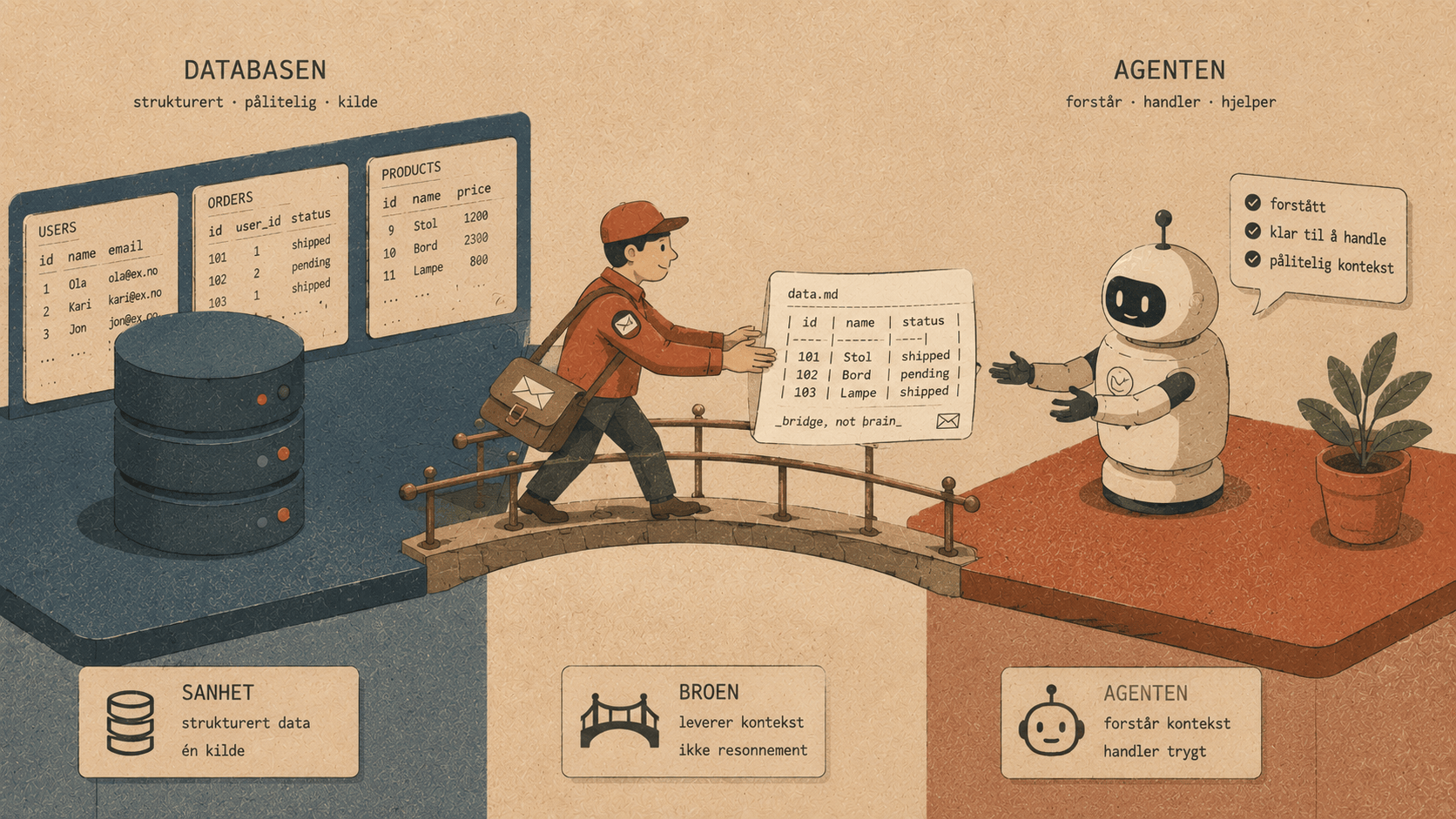
The bridge, not the brain
Here's the important part, the part that keeps Conductor Conductor: this is a bridge, not a brain. Conductor doesn't analyse your data. It doesn't call an API. It doesn't hold a prompt. It takes what you're looking at, formats it as clean markdown, and hands it to an Elyra agent — pre-filled in the composer, waiting for you to add the actual question.
It's the exact same move we made for runbooks a few versions back: Conductor is the courier, Elyra is the one who thinks. The data never leaves your machine except into the agent you opened, and only when you click.
So the feature is really one idea — "send this, as text, to an agent" — wearing four hats.
🤖 Four places to ask
1. A result or a query
Run a query, or browse a table's data, and a 🤖 Elyra button sits next to the export buttons. Click it and Conductor packages the columns and the first rows as a markdown table — plus the SQL itself, if you're in query mode:
Query:
SELECT city, COUNT(*) FROM addresses GROUP BY city ORDER BY 2 DESC;

Here is a result from my postgres database:
┌────────┬───────┐
│ city   │ count │
├────────┼───────┤
│ Oslo   │ 4821  │
├────────┼───────┤
│ Bergen │ 1903  │
├────────┼───────┤
│ …      │ …     │
└────────┴───────┘
Then you type the part only you know: "why is Trondheim missing — bad data or a join issue?" or "rewrite this to bucket by region." The agent has the shape of the data and the query in front of it.
2. A single row
This is the one that feels like magic the first time. Hover any row in the grid and a small 🤖 appears in the # column. Click it and that one row goes over as a tidy column | value table:
Explain this row from orders (mysql):
┌────────────┬─────────────────────┐
│ column     │ value               │
├────────────┼─────────────────────┤
│ id         │ 44                  │
├────────────┼─────────────────────┤
│ status     │ refunded            │
├────────────┼─────────────────────┤
│ total      │ 1290                │
├────────────┼─────────────────────┤
│ created_at │ 2026-05-30 14:02:11 │
└────────────┴─────────────────────┘
"Why would a refunded order still have a positive total?" You didn't retype a thing. The row that confused you is now the row the agent is reasoning about.
3. A table's schema
Flip to the Structure view and the 🤖 button sends the schema — every column, its type, nullability, and keys:
Schema of users (mysql):
┌────────────┬──────────────┬──────────┬─────┐
│ column     │ type         │ nullable │ key │
├────────────┼──────────────┼──────────┼─────┤
│ id         │ bigint       │ NO       │ PRI │
├────────────┼──────────────┼──────────┼─────┤
│ email      │ varchar(255) │ NO       │ UNI │
├────────────┼──────────────┼──────────┼─────┤
│ created_at │ timestamp    │ NO       │     │
└────────────┴──────────────┴──────────┴─────┘
Now "write a Laravel migration that adds a nullable shipped_at timestamp" lands with full context. The agent isn't guessing at your columns — it has them.
4. The SQL itself
Because the query-mode button includes your SQL, "how do I make this faster?" comes with the actual statement attached — no copy-paste, no "wait, which query did I mean.
Why pre-fill instead of auto-send?
You'll notice the snippet lands in the agent's composer and stops. It doesn't fire off a question on its own. That's deliberate, and it's the same choice we made for "Send to Elyra" from runbooks.
The data is context, not a question. Only you know whether you want it explained, optimised, migrated, or just sanity-checked. So Conductor sets the table — literally — and hands you the pen. One row of friction removed (the copy-paste-and-retype), but the intent stays yours.
How it's built (refreshingly little)
There's no new backend, no AI dependency, no clever parsing. The data was already in the browser; the feature is a handful of small functions that turn it into markdown and a button that calls the same sendToElyra path the runbooks use:
function askRow(ri) {
const lines = columns.map((c, i) => | ${c} | ${cell(row[i])} |).join("\n");
onElyra(Explain this row from \${table}` (${engine}):\n\n+| column | value |\n| --- | --- |\n${lines}`);
}
That's the whole shape of it. Pipes get escaped so values don't break the table, newlines get flattened, and onElyra opens a fresh agent with the text waiting. The restraint is the feature — a thin, honest bridge instead of a smart-but-opaque integration.
The fifth verb
Read. Edit. Export. Remember. And now — ask.
The database browser has quietly become a complete little workbench: you can look at your data, change it, take it with you, keep the queries that worked, and — when something puzzles you — pass it to the one part of the system that's allowed to think, without retyping a single column name.
And the line held the whole way. Conductor formats and forwards; Elyra reasons. The cockpit hands over the note; it never reads your mind.
Open a table, hover a strange row, click 🤖, and ask. The bridge is short, and it only goes one way: toward the question you actually wanted to ask. 🪵🔥
Elyra Conductor 0.6.2 — a DB → Elyra bridge that sends results, rows, schemas, and SQL to an agent as pre-filled text. Signed and Apple-notarized. Conductor formats and forwards; it never reasons.