Stop asking the LLM to be a project manager - Elyra v0.7.9
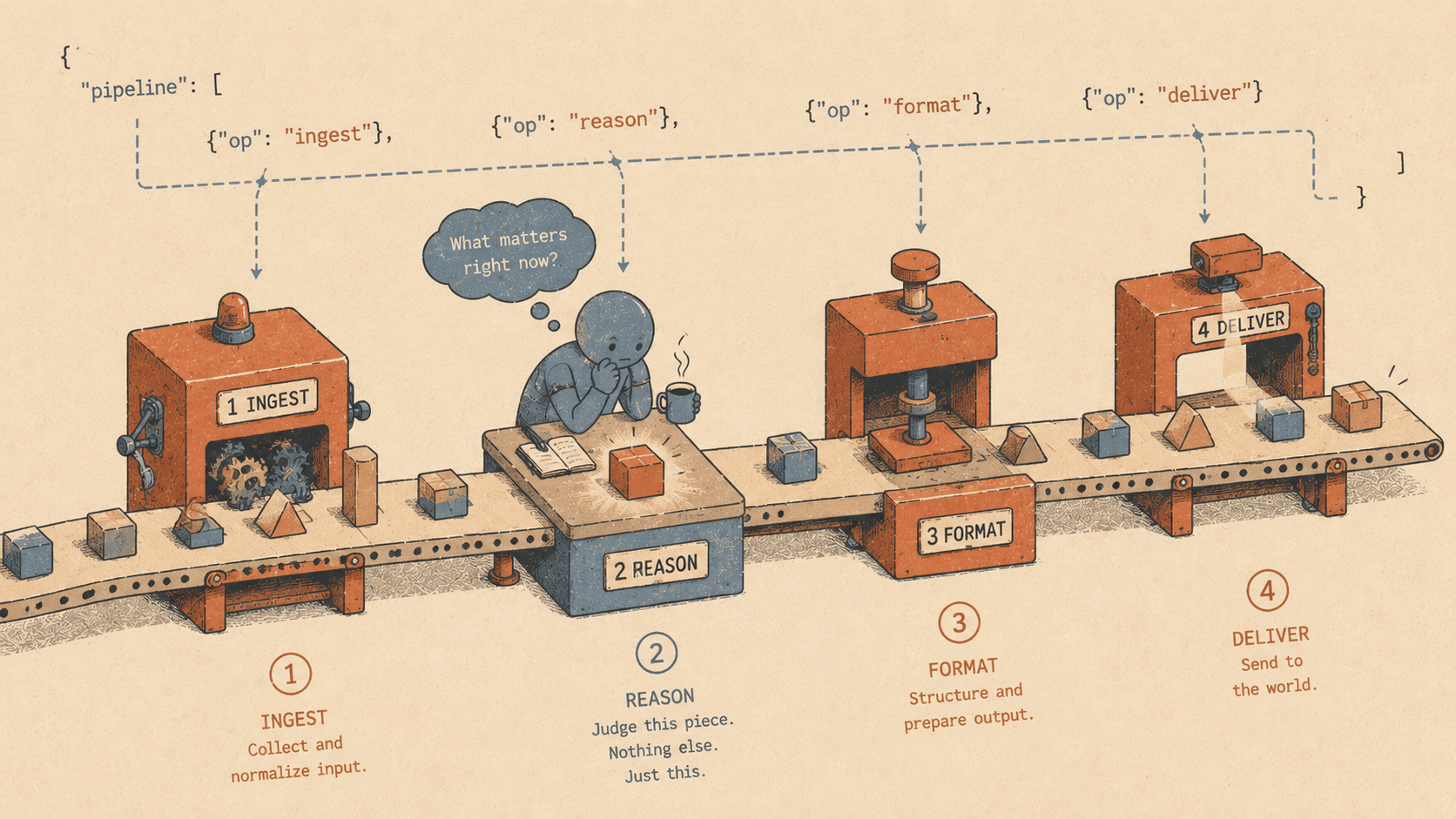
The model is now doing two jobs: thinking about code, and managing a project. It's good at one of those. It's bad at the other.
The token tax
Every time a sub-agent returns a result, that result goes back into the orchestrator's context window. Spawn ten agents to review ten files, and the orchestrator now has ten reviews sitting in its context. It hasn't done any work yet — it's just holding results, getting closer to the context limit, getting sloppier with each addition.
This is the token tax. The LLM pays it on every multi-step task, and you pay it in dollars and degraded output quality.
The fix is obvious once you see it: stop using the LLM as an orchestrator. Use code.
Code orchestrates. Models judge.
@elyracode/workflows introduces a workflow engine where you define pipelines in plain JSON. Code handles the control flow — sequencing, conditions, parallelism. The model only runs when you need judgment, analysis, or generation.
elyra install npm:@elyracode/workflows
Create a workflow file in .elyra/workflows/:
{
  "name": "check",
  "description": "Lint, test, and type-check",
  "steps": [
    { "name": "lint", "run": "npm run lint" },
    { "name": "test", "run": "npm test" },
    { "name": "types", "run": "npm run check" }
  ]
}
Run it with /workflow check. Three shell commands, executed in order, results captured. No LLM involvement at all. The model didn't need to plan this. It didn't need to decide what to run next. The JSON file is the plan.
Mixing code and judgment
The real power shows up when you mix run steps with prompt steps:
{
  "name": "review-and-fix",
  "description": "Find issues, fix them, verify",
  "steps": [
    {
      "name": "find-issues",
      "run": "npm run lint -- --format json 2>&1; npm run check 2>&1"
    },
    {
      "name": "fix",
      "prompt": "Fix all the issues found in the lint and type check output:\n{{steps.find-issues.output}}"
    },
    {
      "name": "verify",
      "run": "npm run check"
    },
    {
      "name": "report",
      "prompt": "Summarize what was fixed and whether verify passed:\n{{steps.verify.output}}"
    }
  ]
}
Step 1 runs the linter and type checker. Code. Fast. Deterministic.
Step 2 sends the output to the LLM and asks it to fix the issues. This is where you want the model — reading error messages, understanding the code, making edits.
Step 3 runs the type checker again. Code. No LLM needed to decide "should I verify?" — the workflow already says to verify.
Step 4 asks the LLM to summarize. Judgment. The model reads the verify output and writes a human-readable summary.
Two LLM calls, two shell commands. The model never had to plan. It never held intermediate results in its context to decide what to do next. Each prompt step got exactly the information it needed, passed by code via {{steps.name.output}}.
Conditions
Sometimes a step should only run if a previous step succeeded:
{
  "name": "deploy",
  "description": "Test, review, deploy",
  "steps": [
    { "name": "test", "run": "npm test" },
    {
      "name": "review",
      "prompt": "Review test output and confirm deploy is safe:\n{{steps.test.output}}"
    },
    {
      "name": "deploy",
      "run": "npm run deploy",
      "if": "{{steps.test.code}} == 0"
    }
  ]
}
The if field evaluates a simple expression using template variables. If tests failed (exit code != 0), the deploy step is skipped. No LLM needed to make that decision.
Parallel steps
Run independent steps concurrently:
{
  "name": "audit",
  "description": "Run all checks in parallel",
  "steps": [
    {
      "name": "checks",
      "parallel": [
        { "name": "lint", "run": "npm run lint" },
        { "name": "test", "run": "npm test" },
        { "name": "types", "run": "npx tsc --noEmit" },
        { "name": "security", "run": "npm audit --production" }
      ]
    },
    {
      "name": "summary",
      "prompt": "Summarize the results of all checks:\nLint: {{steps.lint.output}}\nTests: {{steps.test.output}}\nTypes: {{steps.types.output}}\nSecurity: {{steps.security.output}}"
    }
  ]
}
Four commands run at the same time. One LLM call at the end to synthesize the results. The model sees all four outputs but only once, in a single focused prompt. No orchestration overhead.
Why JSON and not code
You might wonder why workflows are JSON files instead of TypeScript. Three reasons:
The agent can write them. Ask "create a workflow for our deploy process" and the agent writes a JSON file. It can't safely write a TypeScript orchestrator that imports from the right packages and handles error cases.
They're declarative. You can read a workflow and understand what it does without tracing execution paths. The steps are right there.
They're safe. A JSON file can't import
fsand delete your home directory. The only operations are shell commands (which the user defines) and LLM prompts.
How this differs from Swarm
Elyra already has @elyracode/swarm for multi-agent work. They solve different problems.
Swarm is LLM-orchestrated. You give it a high-level goal — "build this feature" — and a swarm of agents figures out the plan: a scout reads the codebase, a planner breaks the task into subtasks, workers execute in parallel, a reviewer checks the output. The orchestrator agent holds all results and decides what happens next. This is powerful for open-ended tasks where you genuinely don't know the steps in advance.
Workflows are code-orchestrated. You define the exact steps. Code runs them. The LLM only participates where you explicitly ask for judgment.
Swarm Workflows Who plans The LLM You, in a JSON file Who decides next step The orchestrator agent The workflow engine Context accumulation Every agent result enters the orchestrator's window Each prompt step gets only what you pass it Best for Open-ended, exploratory tasks Known, repeatable pipelines Determinism Non-deterministic (different plans each run) Deterministic (same steps every time) Token cost High (orchestration overhead) Low (no planning, no result aggregation)
Use Swarm when you need the model to figure out what to do. Use Workflows when you already know what to do and want it done reliably, cheaply, and the same way every time.
The two can work together. A workflow step can trigger a swarm for a complex sub-task, or a swarm agent can call workflow_run to execute a predefined pipeline as part of a larger plan. Code where code works. Models where models work. Both where you need both.
When to use workflows vs. just asking the agent
Ask the agent directly when:
The task is exploratory ("find and fix bugs in this module")
You don't know the steps in advance
You need the model to discover what to do
Use a workflow when:
The steps are known and repeatable
You want deterministic, reproducible execution
Multiple steps need to run in a specific order
You're paying a token tax on multi-step tasks
The sweet spot is tasks you do repeatedly: deploy pipelines, code review checklists, release processes, morning audits. Define the workflow once, run it whenever you need it.
Get it
elyra update
elyra install npm:@elyracode/workflows
Create .elyra/workflows/ and add your first JSON workflow. Run it with /workflow <name> or ask the agent to run it.
Elyra v0.7.9 — changelog