Sessions
Elyra saves conversations as sessions so you can continue work, branch from earlier turns, and revisit previous paths.
Session Storage
Sessions auto-save to ~/.elyra/agent/sessions/, organized by working directory. Each session is a JSONL file with a tree structure.
elyra -c                  # Continue most recent session
elyra -r                  # Browse and select from past sessions
elyra --no-session        # Ephemeral mode; do not save
elyra --session <path|id> # Use a specific session file or partial session ID
elyra --fork <path|id>    # Fork a session file or partial session ID into a new session
Use /session in interactive mode to see the current session file, session ID, message count, tokens, and cost.
For the JSONL file format and SessionManager API, see Session Format.
Session Commands
| Command | Description |
|---|---|
/resume |
Browse and select previous sessions |
/new |
Start a new session |
/name <name> |
Set the current session display name |
/session |
Show session info |
/tree |
Navigate the current session tree |
/rewind |
Rewind session and file state to a previous point |
/fork |
Create a new session from a previous user message |
/clone |
Duplicate the current active branch into a new session |
/compact [prompt] |
Summarize older context; see Compaction |
/export [file] |
Export session to HTML |
/share |
Upload as private GitHub gist with shareable HTML link |
Resuming and Deleting Sessions
/resume opens an interactive session picker for the current project. elyra -r opens the same picker at startup.
In the picker you can:
- search by typing
- toggle path display with Ctrl+P
- toggle sort mode with Ctrl+S
- filter to named sessions with Ctrl+N
- rename with Ctrl+R
- delete with Ctrl+D, then confirm
When available, elyra uses the trash CLI for deletion instead of permanently removing files.
Naming Sessions
Use /name <name> to set a human-readable session name:
/name Refactor auth module
Named sessions are easier to find in /resume and elyra -r.
Branching with /tree
Sessions are stored as trees. Every entry has an id and parentId, and the current position is the active leaf. /tree lets you jump to any previous point and continue from there without creating a new file.
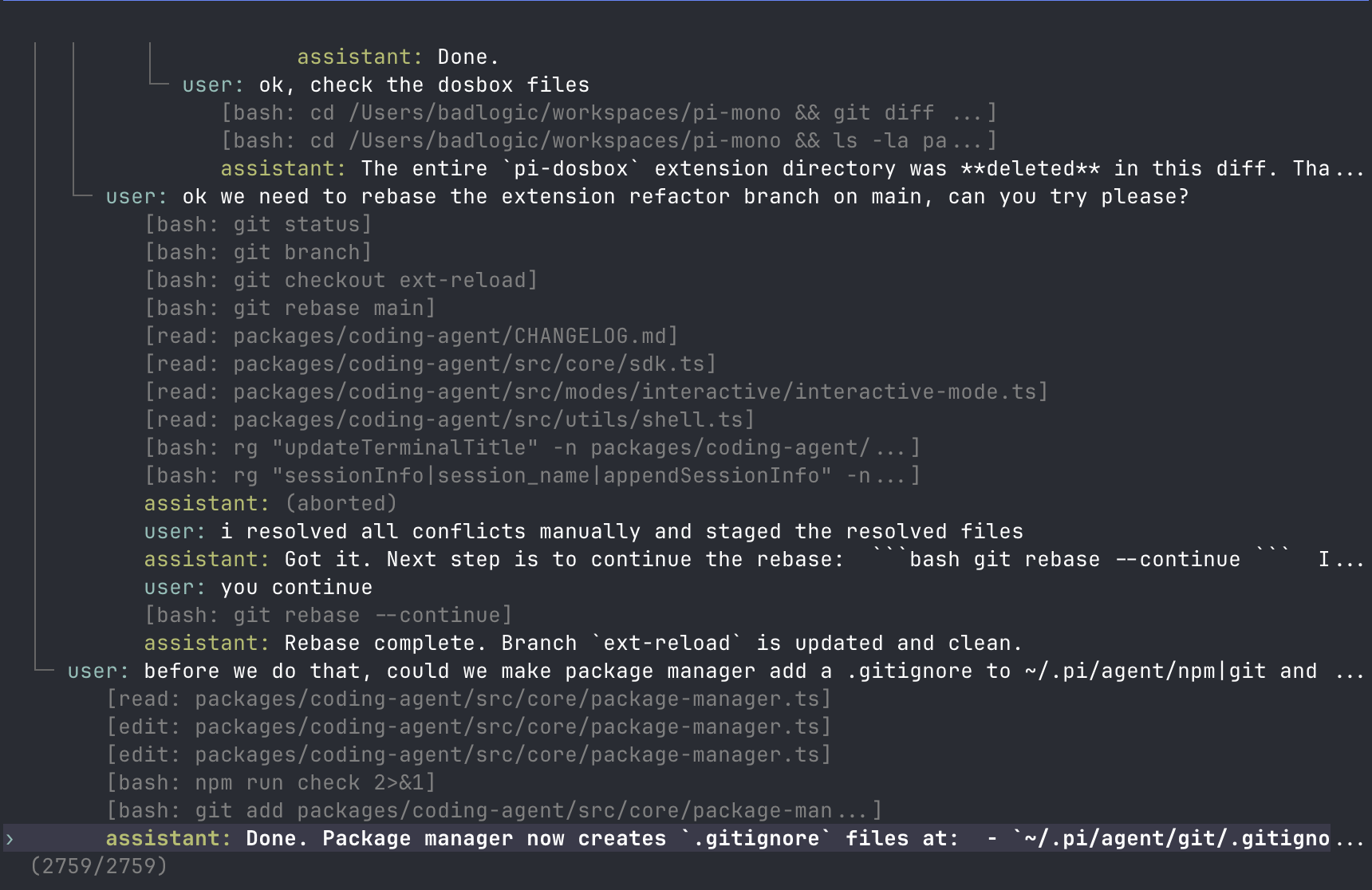
Example shape:
├─ user: "Hello, can you help..."
│  └─ assistant: "Of course! I can..."
│     ├─ user: "Let's try approach A..."
│     │  └─ assistant: "For approach A..."
│     │     └─ user: "That worked..."  ← active
│     └─ user: "Actually, approach B..."
│        └─ assistant: "For approach B..."
Tree Controls
| Key | Action |
|---|---|
| ↑/↓ | Navigate visible entries |
| ←/→ | Page up/down |
| Ctrl+←/Ctrl+→ or Alt+←/Alt+→ | Fold/unfold or jump between branch segments |
| Shift+L | Set or clear a label on the selected entry |
| Shift+T | Toggle label timestamps |
| Enter | Select entry |
| Escape/Ctrl+C | Cancel |
| Ctrl+O | Cycle filter mode |
Filter modes are: default, no-tools, user-only, labeled-only, and all. Configure the default with treeFilterMode in Settings.
Selection Behavior
Selecting a user or custom message:
- Moves the leaf to the selected message's parent.
- Places the selected message text in the editor.
- Lets you edit and resubmit, creating a new branch.
Selecting an assistant, tool, compaction, or other non-user entry:
- Moves the leaf to that entry.
- Leaves the editor empty.
- Lets you continue from that point.
Selecting the root user message resets the leaf to an empty conversation and places the original prompt in the editor.
Rewinding with /rewind
/rewind rolls back both the conversation and the filesystem to a previous point. Unlike /tree which only navigates the session tree, /rewind also restores your files to the state they were in at the selected checkpoint.
How it works
- Elyra automatically creates a git checkpoint before each agent turn (via
git stash create). - Checkpoints are persisted alongside the session file and survive process restarts.
- When you run
/rewind, a selector shows all available checkpoints with timestamps and the number of files that will change. - Selecting a checkpoint navigates the session tree to that point and restores the working tree via
git checkoutandgit stash apply.
Requirements
- The project must be inside a git repository.
- Only tracked file changes are captured. Untracked files created by the agent will not be removed on rewind.
Safety
Before restoring files, elyra creates a safety stash of the current working tree. If something goes wrong, you can recover with git stash list and git stash apply.
/tree, /fork, /clone, and /rewind
| Feature | /tree |
/fork |
/clone |
/rewind |
|---|---|---|---|---|
| Output | Same session file | New session file | New session file | Same session file |
| Restores files | No | No | No | Yes (git) |
| View | Full tree | User-message selector | Current active branch | Checkpoint selector |
| Typical use | Explore alternatives in place | Start a new session from an earlier prompt | Duplicate current work before continuing | Undo agent changes to a known-good state |
| Summary | Optional branch summary | None | None | None |
Use /tree when you want to keep alternatives together. Use /fork or /clone when you want a separate session file. Use /rewind when you want to undo agent changes and restore your files to a previous state.
Branch Summaries
When /tree switches away from one branch to another, elyra can summarize the abandoned branch and attach that summary at the new position. This preserves important context from the path you left without replaying the whole branch.
When prompted, choose one of:
- no summary
- summarize with the default prompt
- summarize with custom focus instructions
See Compaction for branch summarization internals and extension hooks.
Goals
/goal <command> sets a completion condition. After each agent turn, Elyra runs the command. If it exits with code 0, the goal is met and the agent stops. If it fails, the output is sent back to the agent as a new prompt, and the agent continues working.
/goal npm run check
The agent keeps editing and fixing until npm run check passes. Type /goal with no arguments to clear the goal.
Session Format
Session files are JSONL and contain message entries, model changes, thinking-level changes, labels, compactions, branch summaries, and extension entries.
For parsers, extensions, SDK usage, and the full SessionManager API, see Session Format.