The Undo Button That Undoes Everything
How Elyra's /rewind rolls back your conversation and your code together — atomically, with a safety net under the safety net.
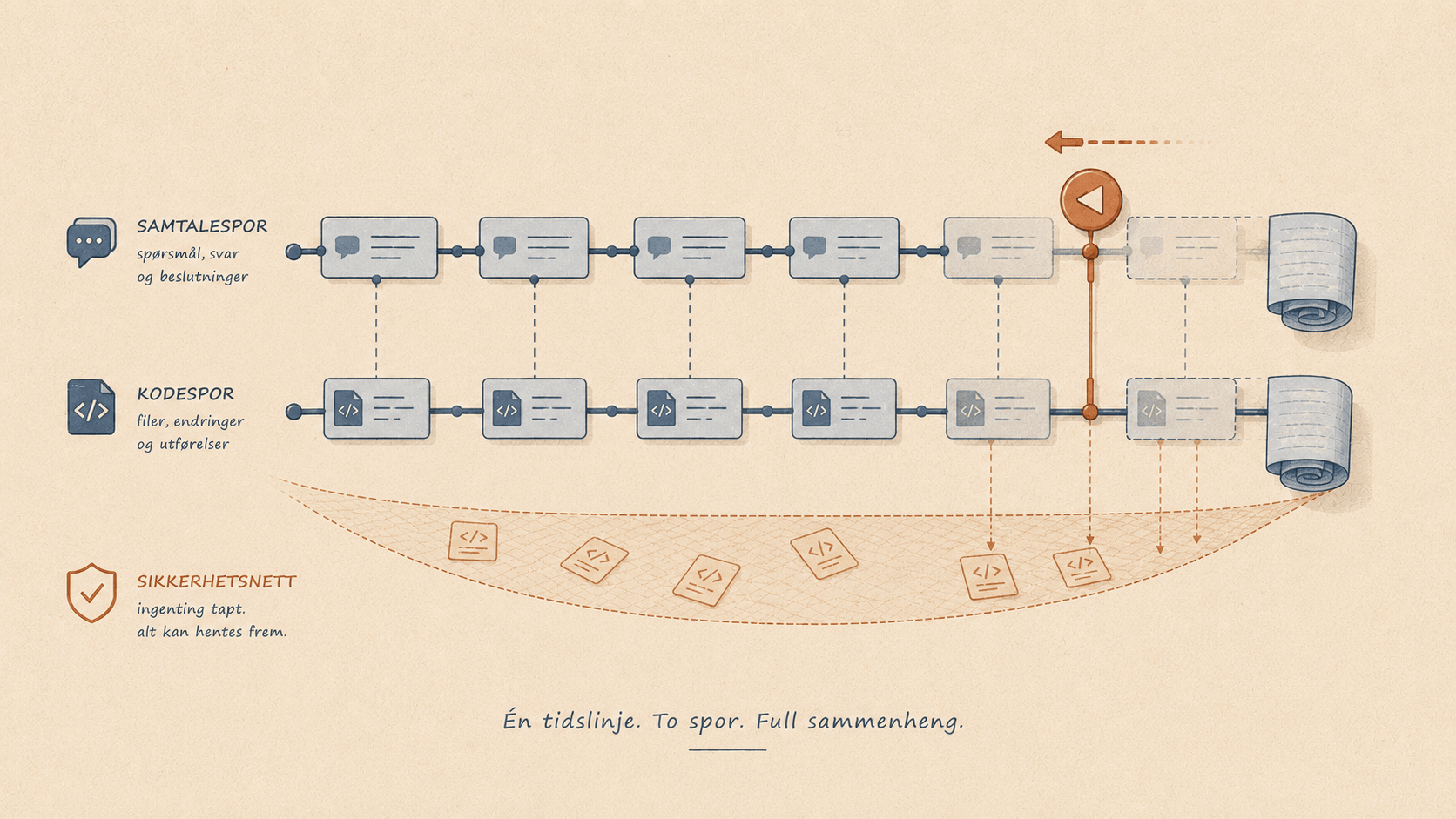
How Elyra's /rewind rolls back your conversation and your code together.
Every coding agent has a moment where it goes off the rails. You ask for a small change, and three turns later it has rewritten four files, "fixed" something that wasn't broken, and left your working tree in a state you don't recognize. The conversation is a mess and so is your code.
Most agents let you undo the conversation. Scroll back, delete some messages, try again. But your files? Those are on their own. The agent changed them on disk, and rolling back the chat doesn't roll back the bytes. You're left running git diff and manually un-doing the damage.
Elyra's /rewind does both at once. It rolls the conversation and the filesystem back to any previous point — together, atomically linked. And it does it with a safety net so you can even undo the undo.
Here's how it works, because the mechanism is genuinely clever.
A snapshot before every turn
The foundation is automatic. Before the agent takes any turn that might modify files, Elyra quietly creates a checkpoint. From the actual code, it hooks the turn_start event:
} else if (event.type === "turn_start") {
    // Create git checkpoint before the agent modifies files
    this._createCheckpoint();
    ...
}
You never ask for this. You never wait for it. It just happens, every turn, in the background.
The question is how it snapshots your files without getting in your way. The naive approach — git stash — would be a disaster. Real git stash rips your changes out of the working tree and pushes them onto a stack. If Elyra did that before every turn, your files would keep vanishing.
Instead, Elyra uses a lesser-known git primitive:
export function createStashCommit(cwd: string): string {
    const result = git(["stash", "create"], cwd);
    return result.ok ? result.stdout : "";
}
git stash create is the quiet cousin of git stash. It builds a commit object capturing the current state of your tracked files — and then does nothing else. It doesn't touch your working tree. It doesn't add anything to the stash list. It just hands back a commit hash and walks away. Your files stay exactly where they are; Elyra simply remembers a pointer to "here's what everything looked like at this instant."
Each checkpoint records four things:
interface Checkpoint {
    entryId: string;    // which conversation entry this maps to
    stashRef: string;   // the snapshot commit (empty if tree was clean)
    headRef: string;    // HEAD at snapshot time
    timestamp: string;
}
The crucial field is entryId. Every checkpoint is tied to a specific point in the conversation. That linkage is what makes the magic possible — the chat and the code share a single timeline.
Checkpoints survive everything
Checkpoints are written to a file next to your session, with an atomic write so a crash can't corrupt them:
export function saveCheckpoints(filePath: string, checkpoints: Map<string, Checkpoint>): void {
    const tmpPath = `${filePath}.tmp`;
    writeFileSync(tmpPath, JSON.stringify([...checkpoints.values()]));
    renameSync(tmpPath, filePath);
}
Because they're persisted, they outlive the process. Close Elyra, come back tomorrow, reopen the session — the rewind points from yesterday are still there, loaded from disk:
// Load any existing checkpoints from a previous process
if (this._checkpoints.size === 0) {
    this._checkpoints = loadCheckpoints(this._checkpointsPath);
}
Your undo history isn't a fragile in-memory thing. It's durable.
The rewind itself
Type /rewind and you get a list of points you can return to — each conversation entry that has a checkpoint, annotated with how many files would change if you went back there:
const filesChanged = isCurrent ? 0 : getFilesChangedByRewind(this._cwd, checkpoint).length;
So before you commit to anything, you can see "this rewind will touch 4 files" versus "this one touches 12." No surprises.
Pick a point, and rewind() does three things in order:
First, it creates a safety stash. Before changing anything, it snapshots the current state so the rewind itself is reversible:
// Create a safety stash so the user can undo the rewind
const undoRef = createSafetyStash(this._cwd) || undefined;
This is the part I love. Even the destructive operation has an undo. If you rewind and immediately realize you went too far, the state you left is preserved.
Second, it rewinds the conversation by navigating the session tree back to the target entry — no summarization, because you're rewinding, not branching.
Third, it restores the files to match the checkpoint:
// Step 1: Reset tracked files to HEAD
git(["checkout", "--", "."], cwd);
// Step 2: Apply the checkpoint snapshot on top
if (checkpoint.stashRef) {
git(["stash", "apply", checkpoint.stashRef], cwd);
}
Reset everything to your last commit, then replay exactly the changes that existed at the checkpoint. Your working tree now matches what it looked like at that point in the conversation — and the conversation matches too.
It refuses to do something dumb
A rollback feature that loses work is worse than no feature. Elyra guards against the failure modes.
It checks that the snapshot commit hasn't been garbage-collected by git before trying to use it:
if (checkpoint.stashRef && !isValidRef(cwd, checkpoint.stashRef)) {
return { ok: false, error: "Checkpoint ref has been garbage-collected by git" };
}
It notices if HEAD has moved since the checkpoint (you committed in between) and handles the apply carefully rather than blindly. And if you're not in a git repository at all, it simply doesn't create checkpoints — no errors, no fake promises, the feature just isn't there.
The honest fine print
Two things worth knowing, because I'd rather you trust the feature than be surprised by it.
git stash create captures files git is already tracking — modifications and staged changes. It does not capture brand-new untracked files. So if the agent created a file from scratch, a rewind won't delete it. In practice this is a safe default: you don't lose new work unexpectedly. But it means "undo everything" really means "restore every tracked file to its checkpoint state," not "vaporize all traces."
And the whole feature lives on git. No repo, no checkpoints. For a coding agent that's a reasonable bet — you're almost certainly in a repo — but it's worth saying plainly.
Why this matters
The reason agents feel risky is that their mistakes are sticky. A bad suggestion in a chat is harmless; you ignore it. A bad edit is on your disk now, mixed in with your good changes, and untangling it costs more time than the agent saved.
/rewind removes that risk. It turns the agent's filesystem changes from permanent facts into provisional experiments. Let it try something ambitious. If it works, keep it. If it doesn't, one command puts both the conversation and the code back exactly where they were — with a safety net under that too.
It's the difference between working with a tool you have to babysit and working with one you can actually let off the leash.
/rewind