The Cheapest Optimization Is the One You Don't Make
A terminal text editor was doing the same expensive work three times per keypress. The fix was easy — and a bigger, faster fix was sitting right next to it. This is about why I walked away from the bigger one.
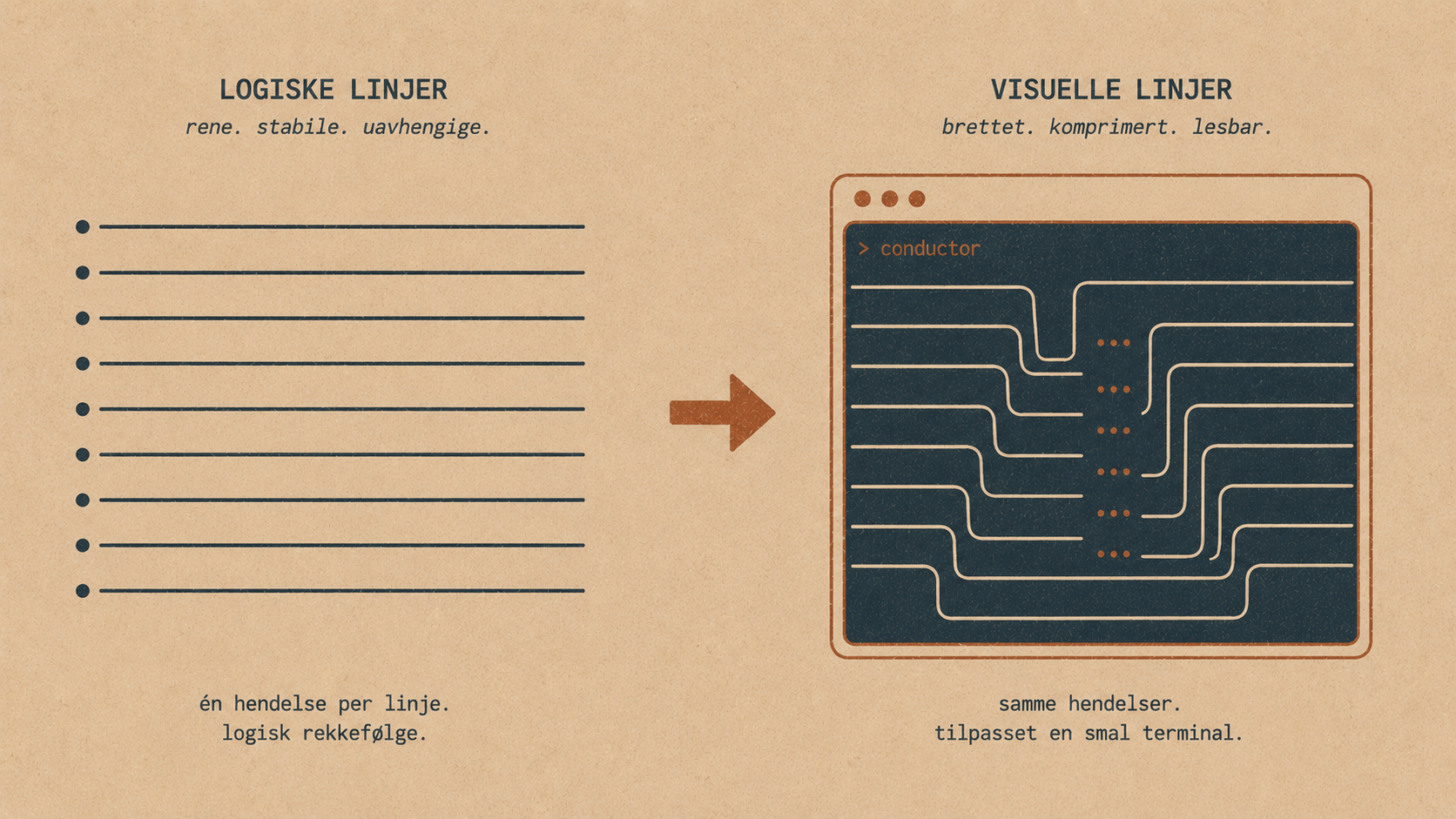
A small story about a text editor, a memo, and knowing when to stop
Most optimization stories are about going faster. This one is partly about that — but mostly it's about a temptation I deliberately walked away from, and why walking away was the right call.
It starts with a text editor that was doing the same expensive work three times for no reason.
Two kinds of lines
When you type into Elyra's prompt editor, it stores your text as a list of logical lines — exactly what you typed, split wherever you pressed Enter:
[
  "function greet(name) {",
  "  return `Hello ${name}, welcome to this very long application`;",
  "}"
]
But a terminal is only so wide. When a logical line is wider than the terminal, it has to wrap across several screen rows. Those are visual lines:
┌─ terminal, 40 columns ────────────────┐
│ function greet(name) {                │  ← logical line 0  → 1 visual line
│   return `Hello ${name}, welcome to   │  ┐
│ this very long application`;          │  ┘ ← logical line 1  → 2 visual lines
│ }                                     │  ← logical line 2  → 1 visual line
└────────────────────────────────────────┘
This distinction matters more than it looks. When you press the down arrow, you expect the cursor to move to the next line on screen — the next visual line — not necessarily the next line in your array. So the editor keeps a function, buildVisualLineMap(), that works out exactly where every logical line lands on screen after wrapping.
The expensive part
Building that map isn't free. For every logical line, the editor has to:
Measure its visible width — and "visible" is subtle, because emoji are double-width, some Unicode characters are too, and ANSI color codes take up bytes but no visible space.
If it's too wide, run a word-aware wrap to figure out where the breaks fall.
For a short prompt, this is nothing. But paste in 500 lines of code, and each call does real, measurable work — it scales with the total amount of text in the editor.
Here's the part that bothered me. A single keypress triggered this work two or three times. Press the down arrow, and the editor would ask:
isOnLastVisualLine()  → buildVisualLineMap()   (build #1)
moveCursor()          → buildVisualLineMap()   (build #2)
The same map, computed from scratch, several times, for one arrow key. Pure waste. You could feel it as a faint drag when navigating a large pasted block — that subtle lag that reminds you, every time, that you're using software.
The obvious fix
The fix is the oldest trick in the book: memoization. Compute it once, remember the answer, hand back the remembered answer next time.
private visualLineMapMemo: {
    width: number;
    map: Array<{ logicalLine: number; startCol: number; length: number }>;
} | null = null;
private buildVisualLineMap(width: number) {
// Already computed for this width? Hand it back.
if (this.visualLineMapMemo && this.visualLineMapMemo.width === width) {
return this.visualLineMapMemo.map;
}
// ... the expensive work ...

this.visualLineMapMemo = { width, map: visualLines };
return visualLines;

}
Now those two or three calls per keypress cost exactly one real computation. The rest read from the memo. Done.
Except — this is where it gets interesting.
The trap
A cache that hands back stale data is worse than no cache at all.
Think about what staleness means here. If you type a character and the visual-line map doesn't update, the editor now believes your text is laid out differently than it actually is. The cursor jumps to the wrong place. Lines wrap where they don't. The display lies to you. For a text editor — the one tool whose entire job is to show you your text accurately — that's not a glitch, it's a catastrophe.
So the real engineering problem was never "make it fast." It was "make it fast without ever showing the wrong thing."
The safe answer: make the memo forgetful
The solution was to make the memo extremely short-lived. I clear it at the very start of every keypress:
handleInput(data: string): void {
this.visualLineMapMemo = null;  // ← first line of every keypress
...
}
and on any programmatic text change.
The insight that makes this safe is a property of how the editor actually behaves. Within a single keypress, the editor does one of two things:
Navigation — it calls
buildVisualLineMap()several times, but it never changes the text.Editing — it changes the text, but it never calls
buildVisualLineMap().
These never mix in the same keypress. Typing a character doesn't ask where the visual lines are; pressing an arrow doesn't edit anything. So within any single keypress, the text is guaranteed to be stable while the map is being read. The memo captures the redundant calls inside that one keypress and then is thrown away before the next one can change anything.
Keypress: down arrow  →  clear memo  →  build map  →  read memo  →  read memo
Keypress: type "x"    →  clear memo  →  (no map calls — only text changes)
Keypress: down arrow  →  clear memo  →  rebuild map (now including "x")
The memo physically cannot survive a text change. That's not a convention I'm hoping holds — it's structurally true.
The optimization I didn't make
Here's the temptation, and the actual point of this post.
There's a bigger, better-performing version of this. Instead of throwing the memo away every keypress, you could cache the map across keypresses, and only rebuild it when the text actually changes. That would eliminate even more work — not just the redundant calls within a keypress, but the rebuilds between keypresses where nothing changed.
It's right there. It's more performance. And I didn't do it.
Because to make a cache that survives across keypresses correct, I'd have to invalidate it every single time the text changes — and the editor's text gets mutated in more than fifteen places. Backspace, forward-delete, word-delete, paste, autocomplete, yank, line-merge, undo — many of them editing the array in place with splice. A cache that lives across edits is only correct if I bust it at every one of those fifteen-plus sites, every time, forever, including in code nobody's written yet.
Miss one — just one — and you get a corrupted display that's maddening to track down, because it only shows up after a specific sequence of edits. The performance win is real. The risk is a class of bug that erodes trust in the one component that can least afford it.
So I made the trade deliberately: correctness over maximum speed. The per-keypress memo catches the actual redundancy that was hurting — those two-to-three duplicate calls — with zero risk, because it can't outlive a mutation. The cross-keypress cache would squeeze out a bit more, at the cost of a fragile invariant spread across the whole file.
The lesson
The instinct, when you find an optimization, is to take all of it. The bigger cache is right there, glittering, promising more.
But the best version of a fix isn't always the fastest one. It's the one that captures the real win while staying impossible to get wrong. A small, safe optimization that you can reason about completely beats a large, fragile one that depends on you never making a mistake — especially in code that other people, and future you, will keep editing.
The editor is faster now where it matters: navigating large inputs no longer drags. And it has exactly zero new ways to show you the wrong thing. That second part is the one I'm proud of.
Sometimes the cheapest optimization really is the one you choose not to make.